
link"Intellectual selection of products in block (analogues, accessories) by features" documentation
linkOverview
linkFeatures
linkGeneral information
The add-on is designed for automatic creation of Related products selections for Reference product on the bases of the technical features of its values for Reference and Related products (it provides the intellectual approach as values of the product features are analyzed during selection. It makes the selections maximally logical and comfortable for clients).
-
allows creating the links on the bases of reference to Category - Category (you can select the Related products from Category B for Reference products from Category A or you can select the Related products for Category A in the mode of selection of analogical Reference products)
-
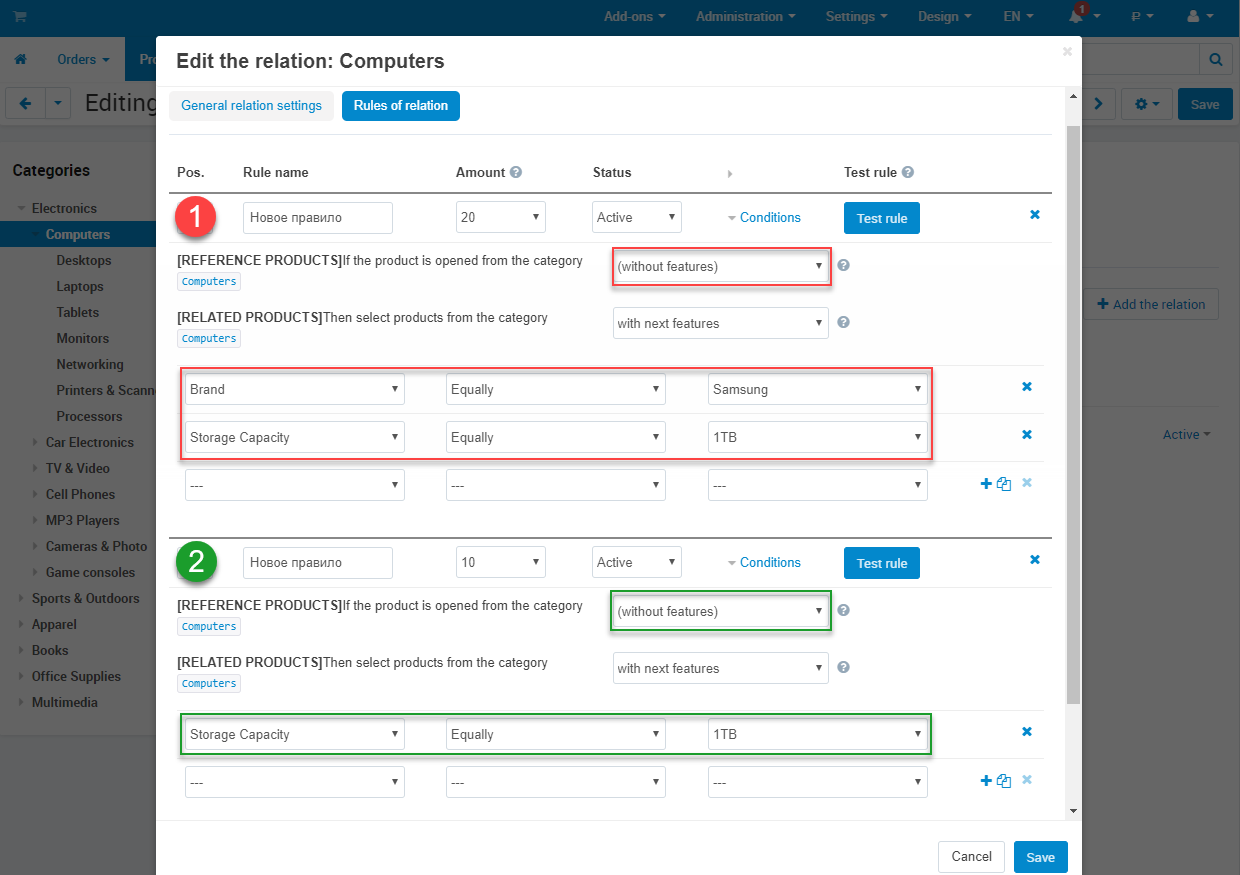
in the frame of link the add-on allows creating the rules of selection which can work in two modes:
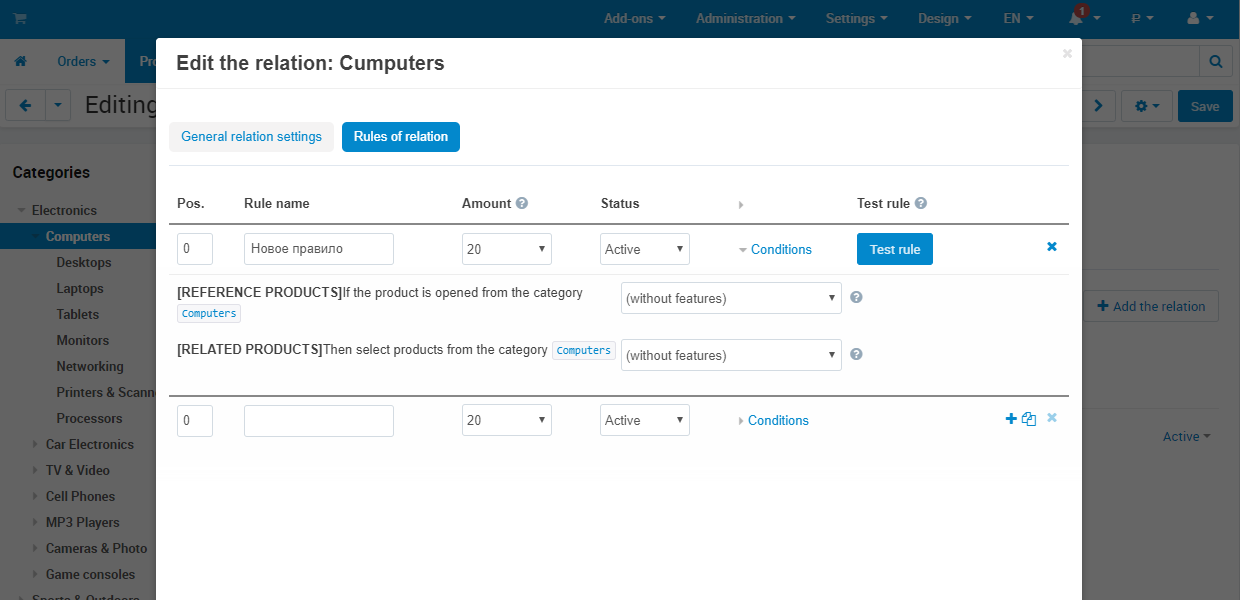
1) Without features ‒ for all products from Reference category will be selected the products from Related categories without any features.
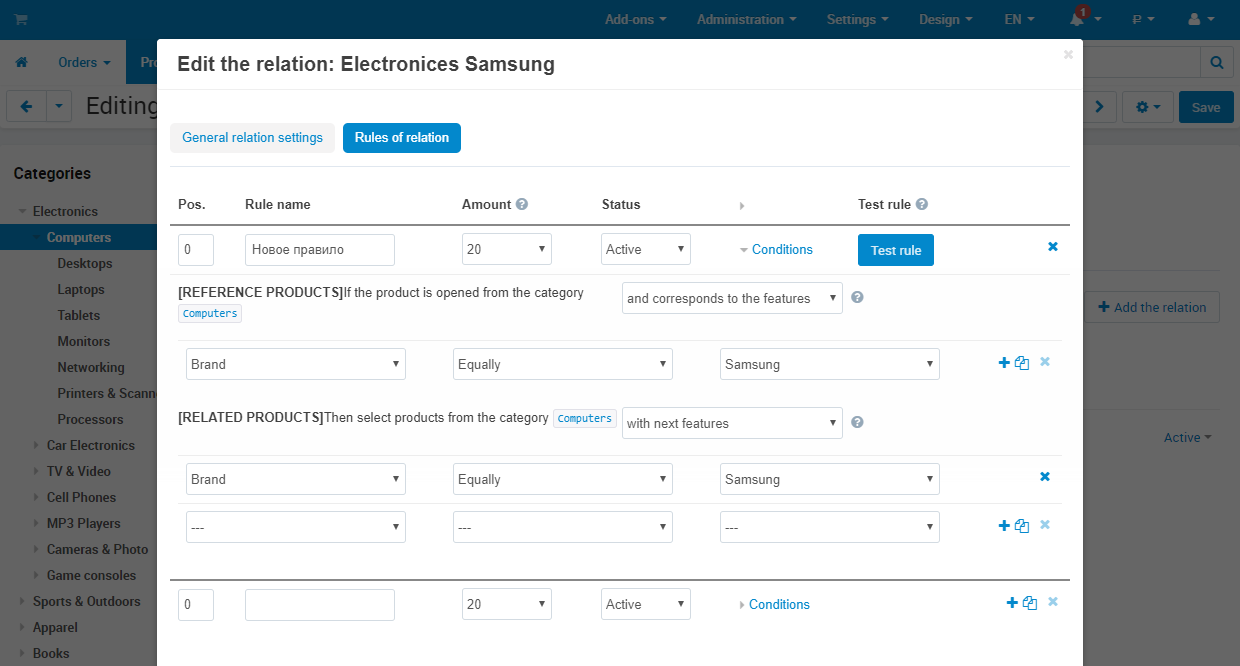
2) With features ‒ the system will show the Reference products on the bases of mentioned features and its values, and select Related products with the appropriate features and its values.
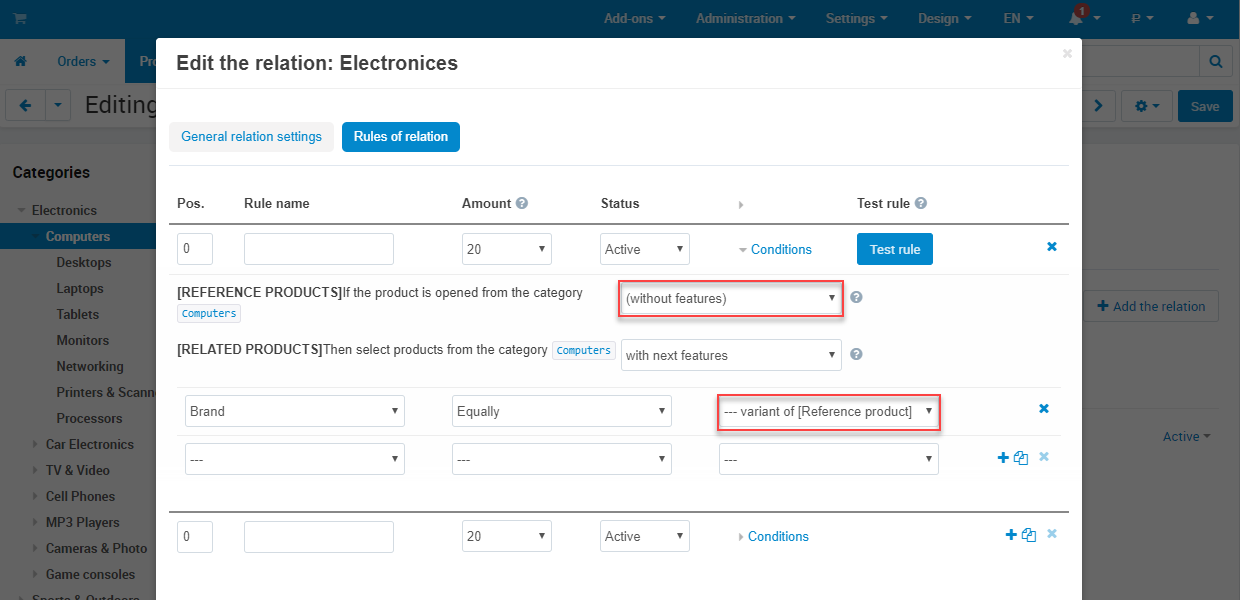
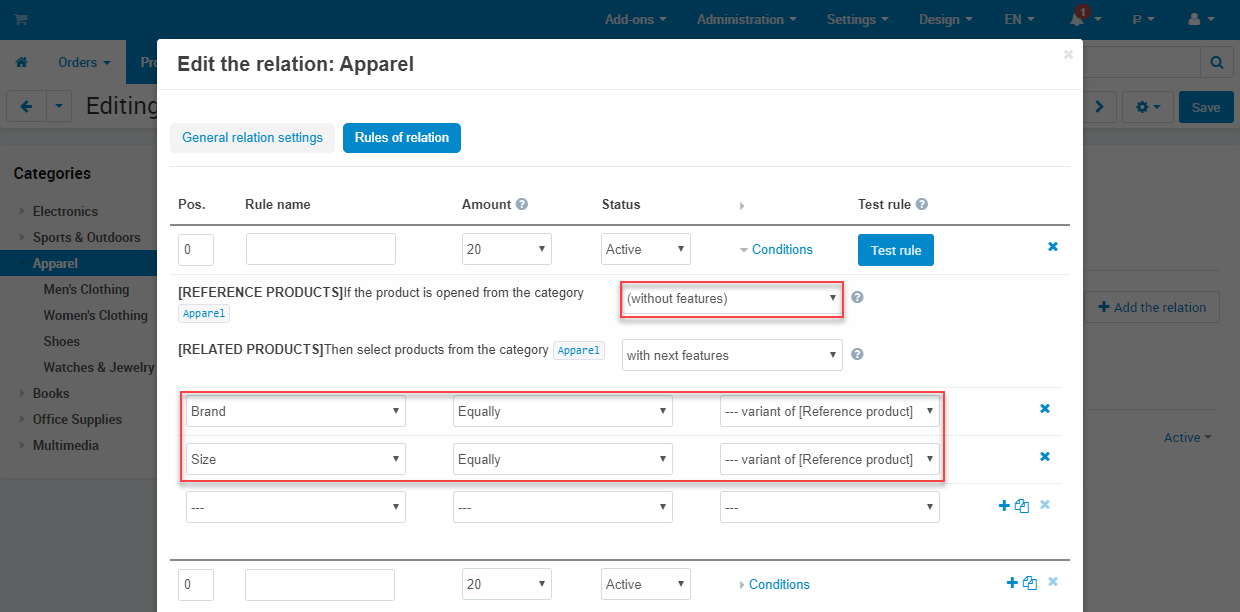
For With features mode when selecting Related products, it is available a special variant of feature value Variant of Reference product for Equally operator. In this case the system will select Related products according to the features values of the Reference product (Related products will have the same features values as the Reference one).
-
allows to take into account price, products in stock, manage quantity in a selection and products sorting.
-
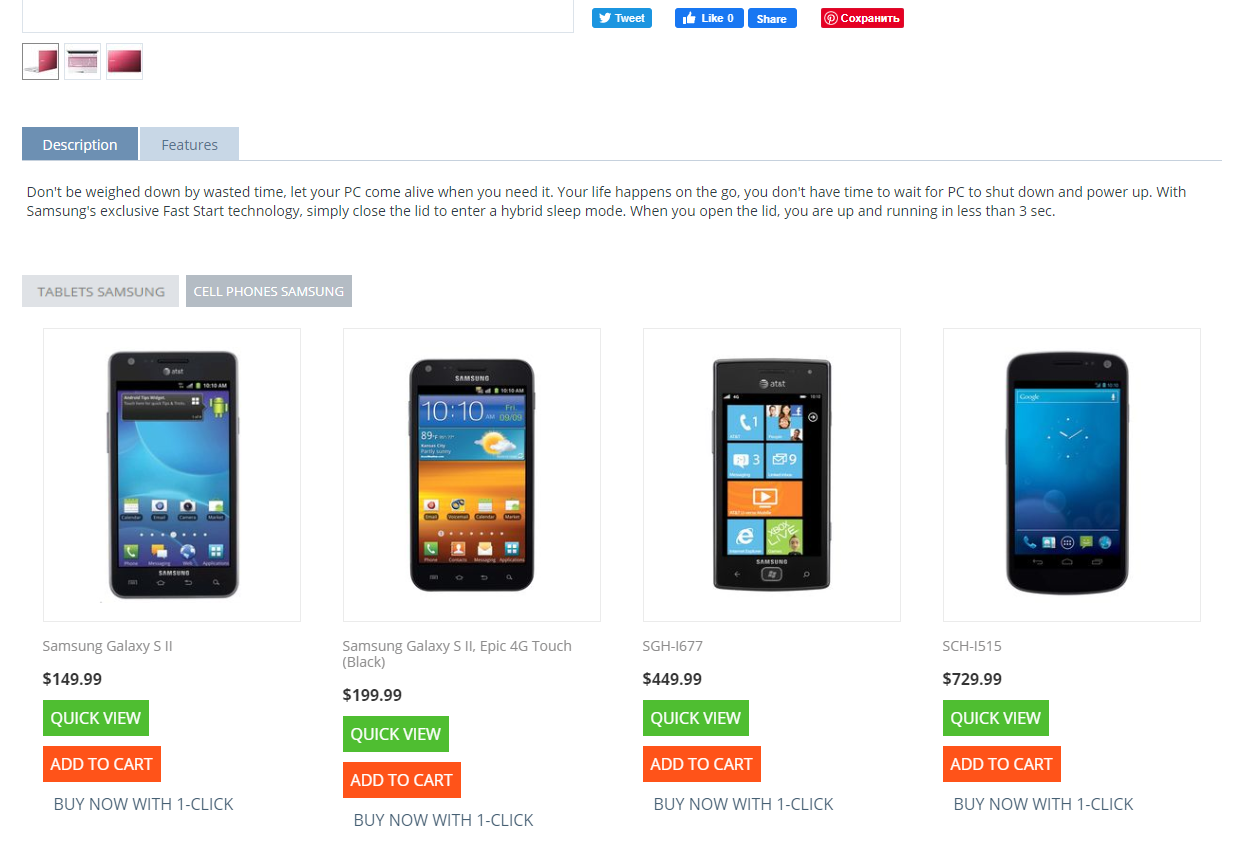
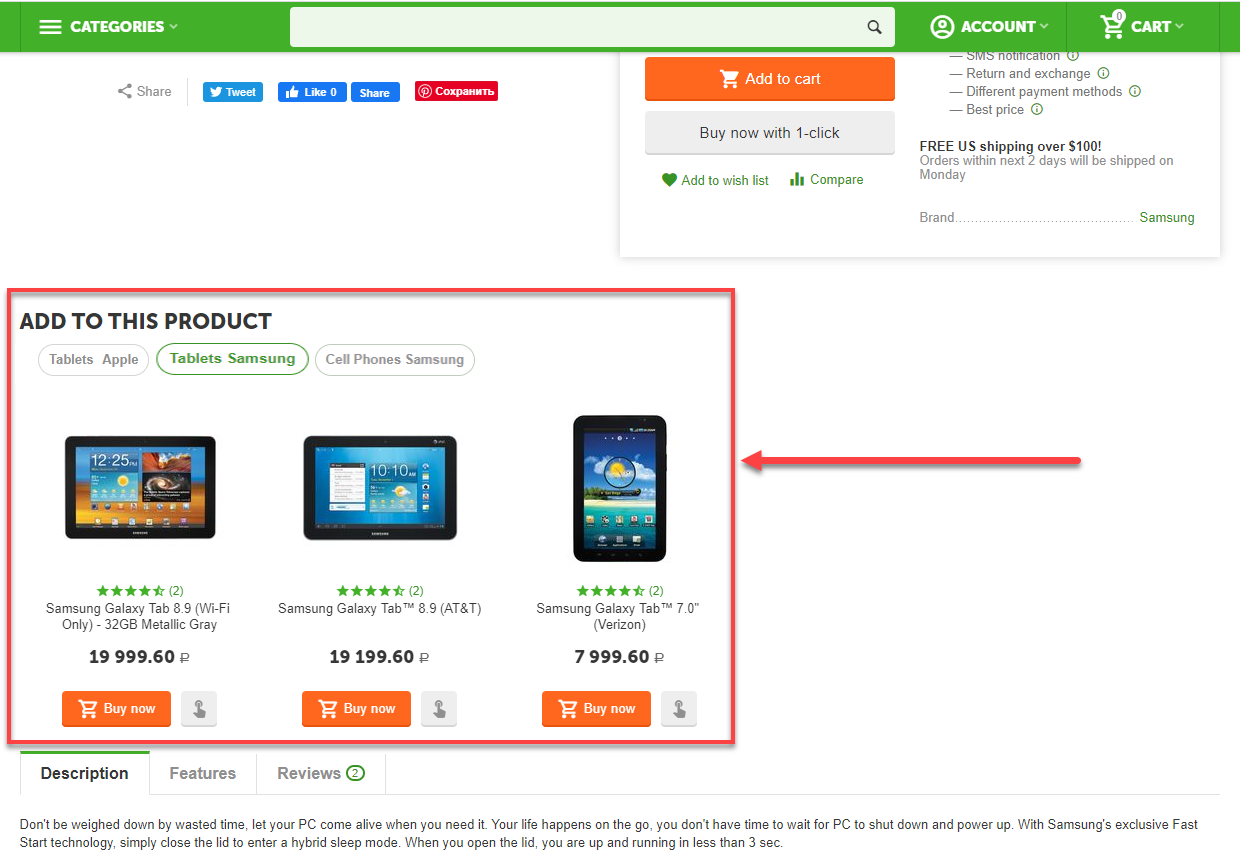
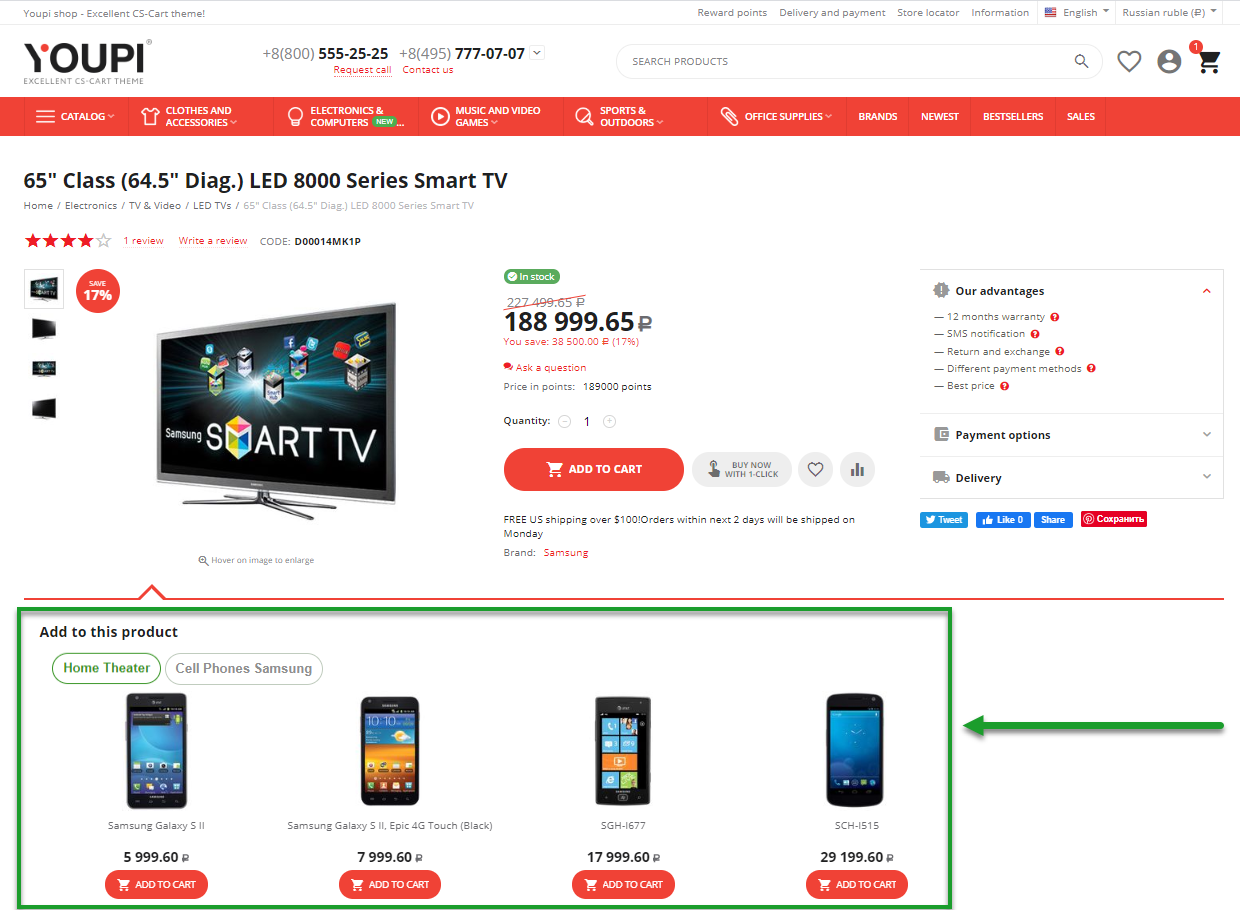
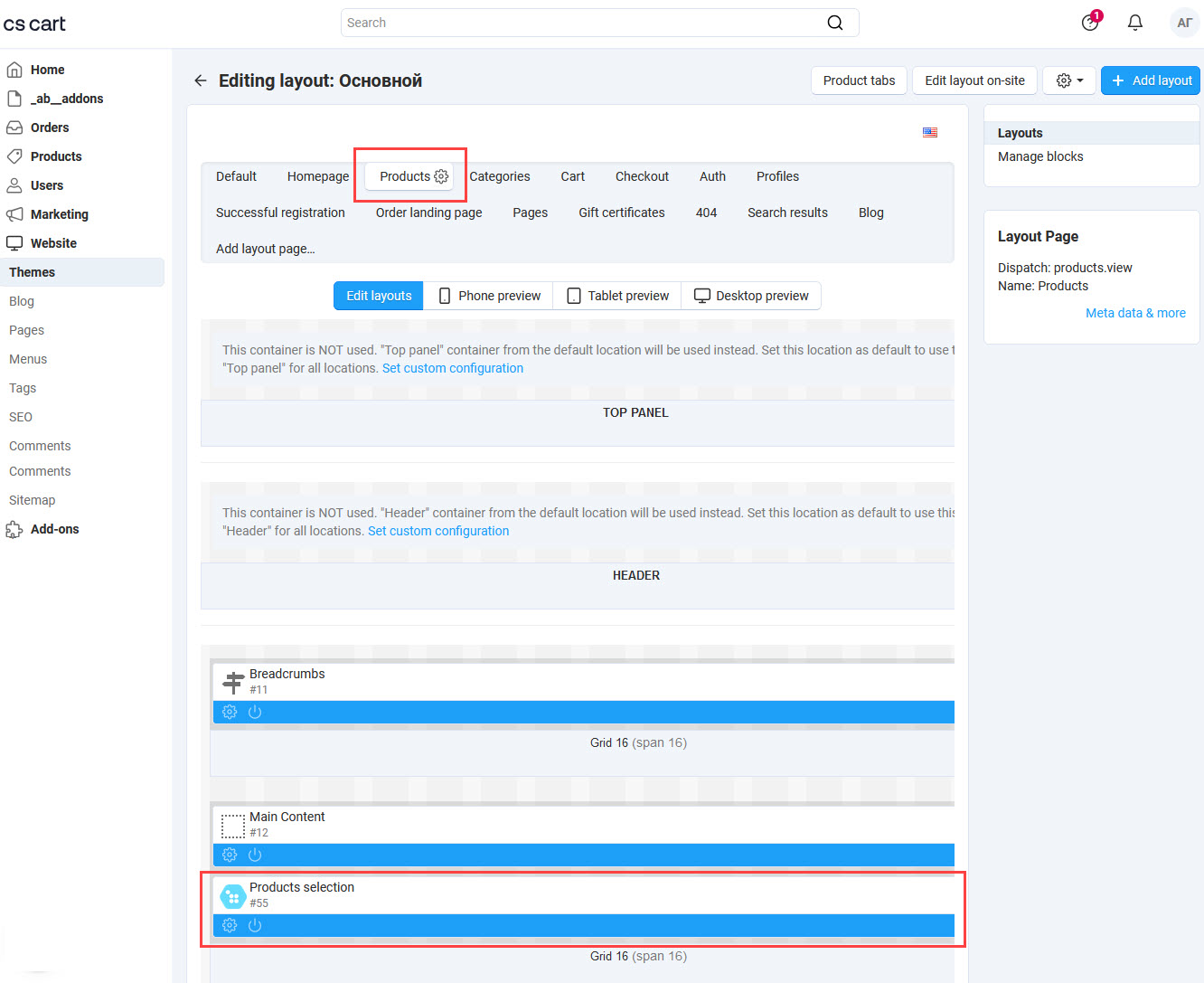
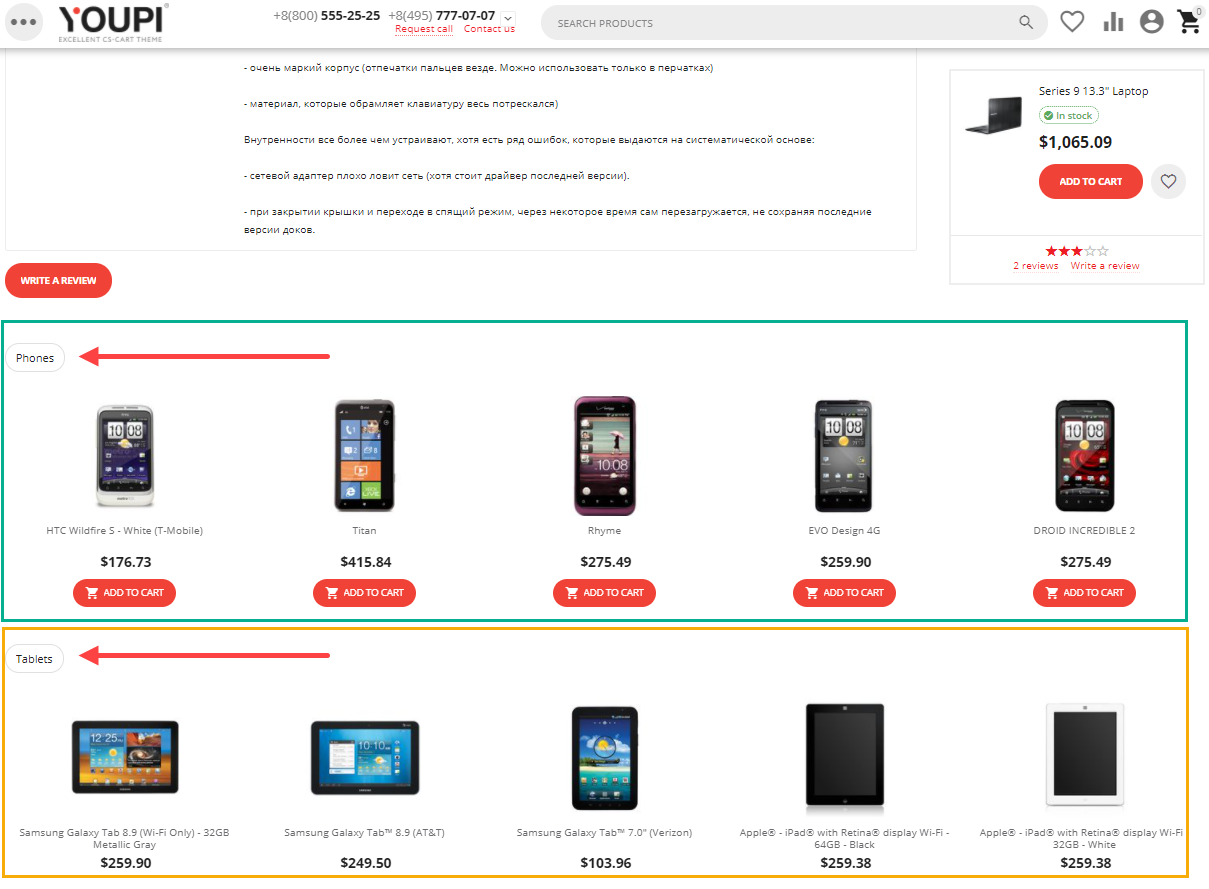
adds a block (with individual settings) for the product page to display selected products that are separated with tabs according to its relations (block view is provided additionally for UniTheme2 and YoupiTheme to more conversion places without layouts). Besides, the tab name will be the name of the appropriate relation.
-
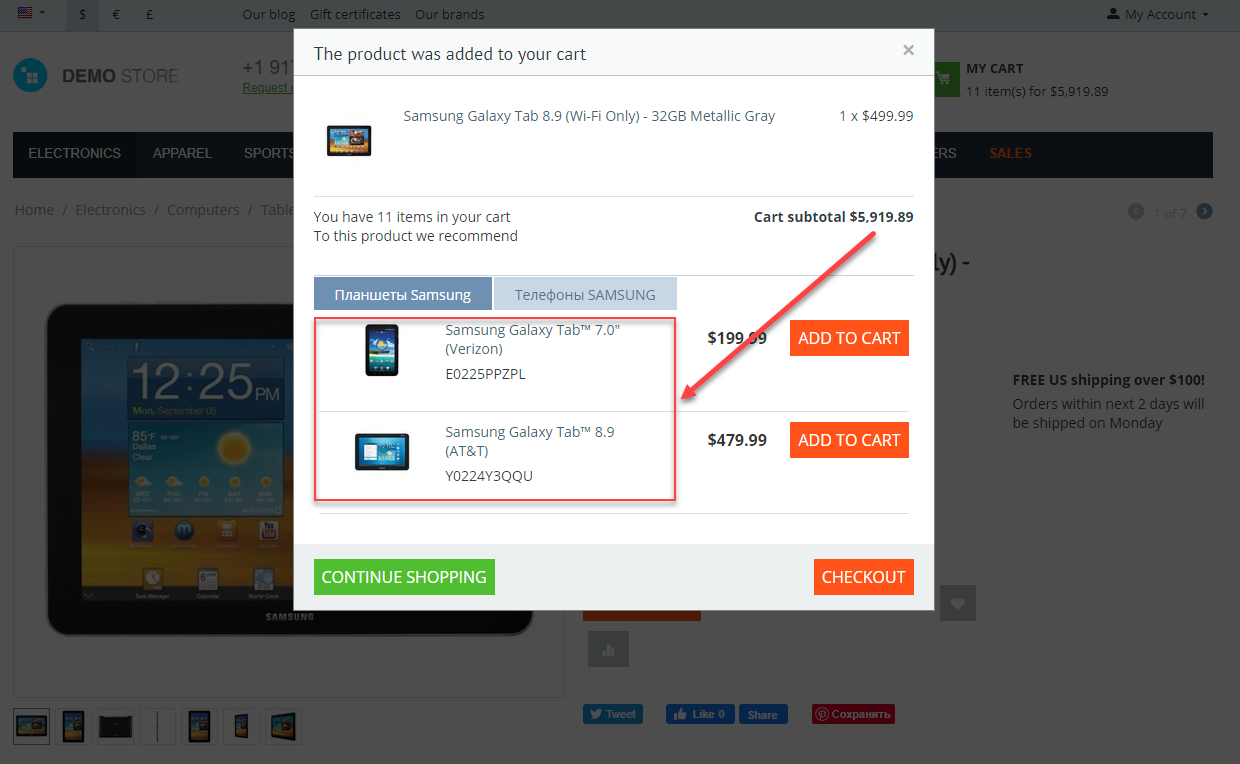
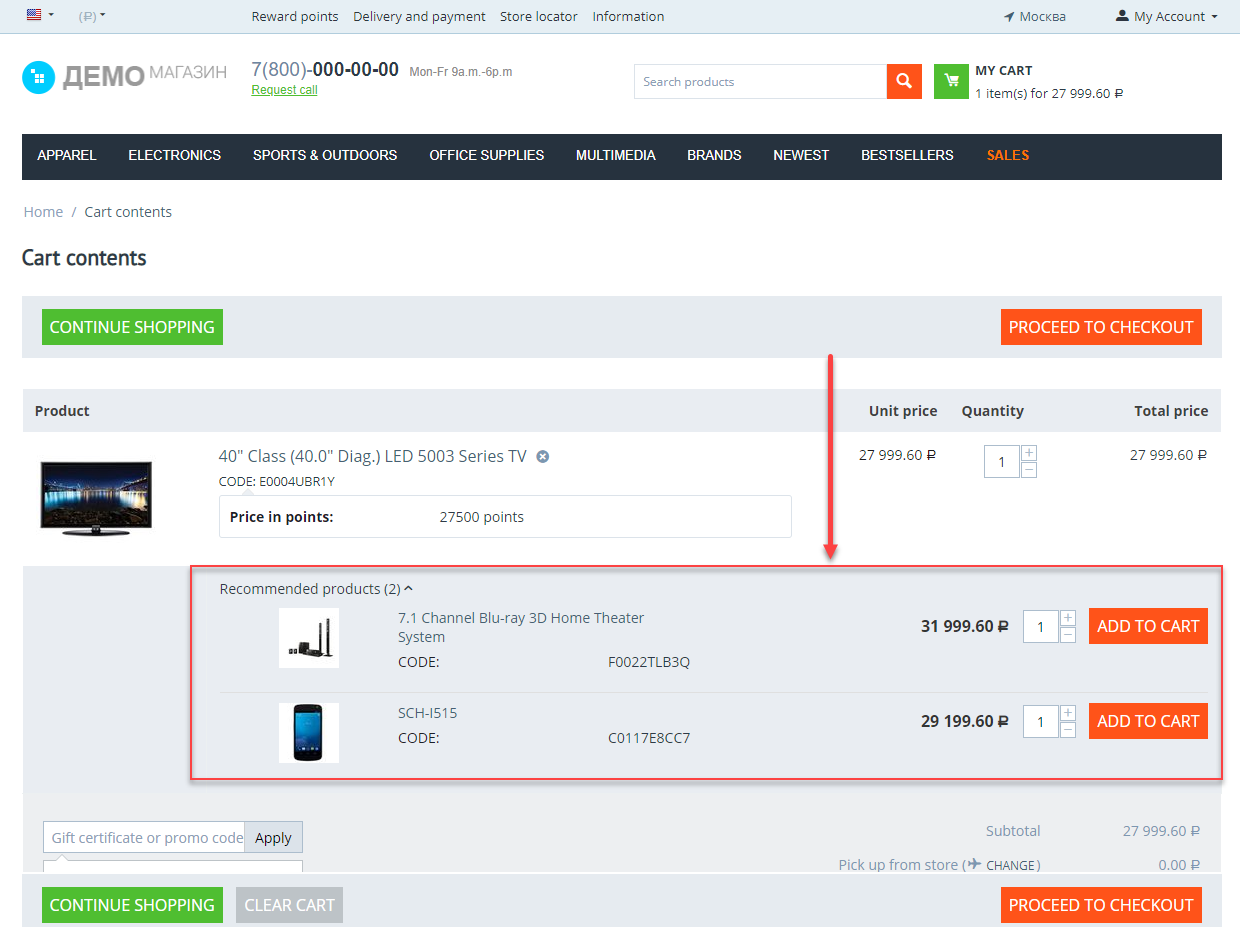
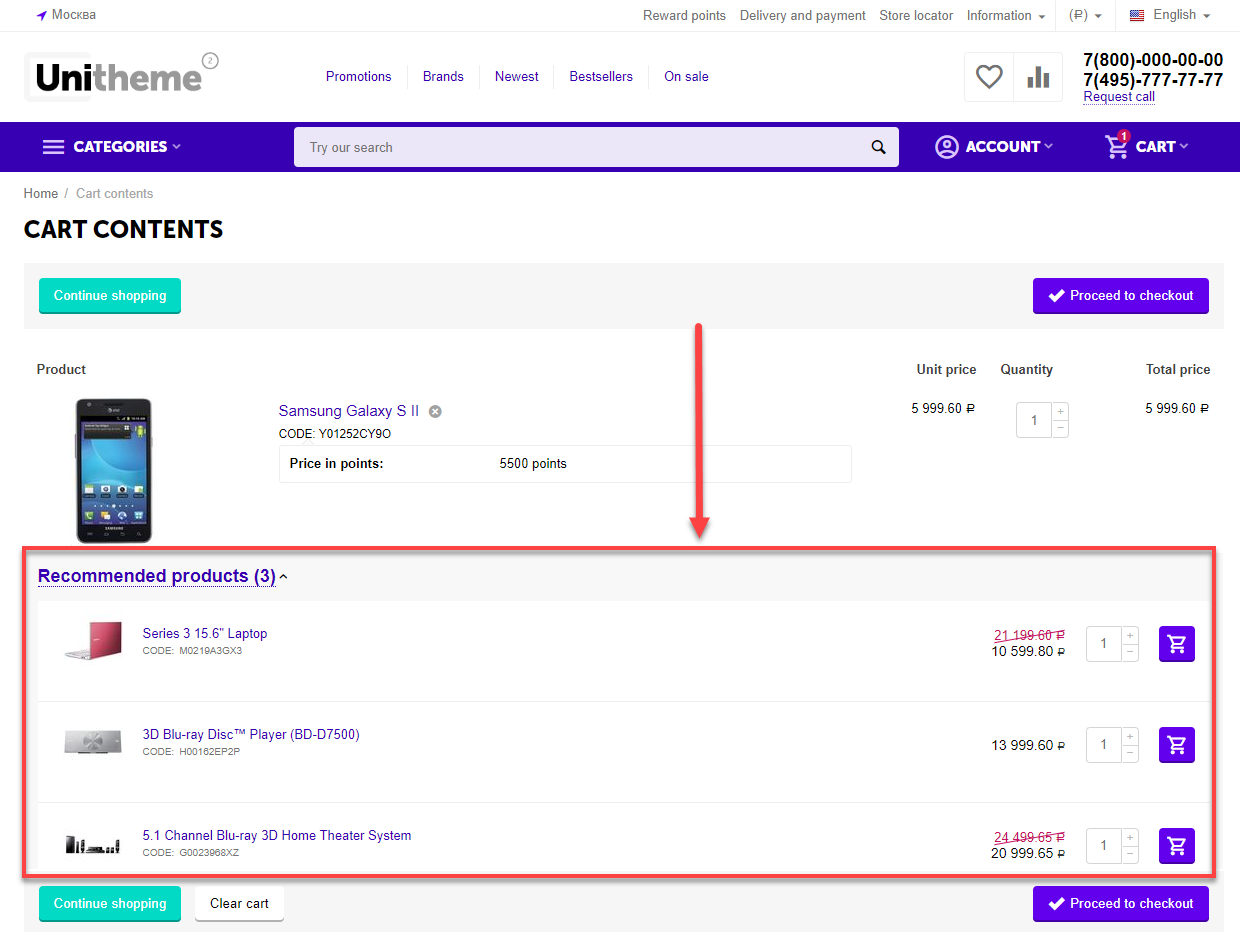
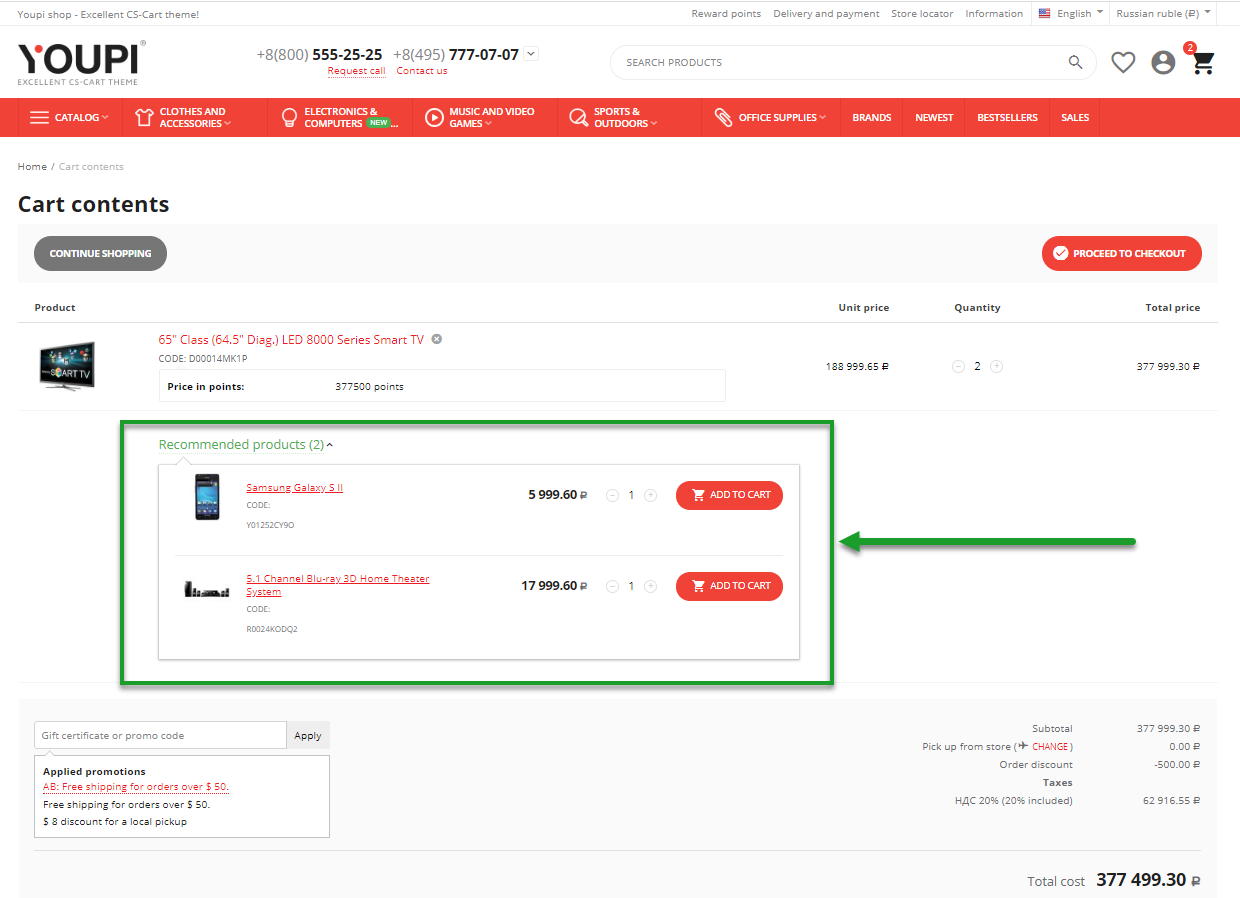
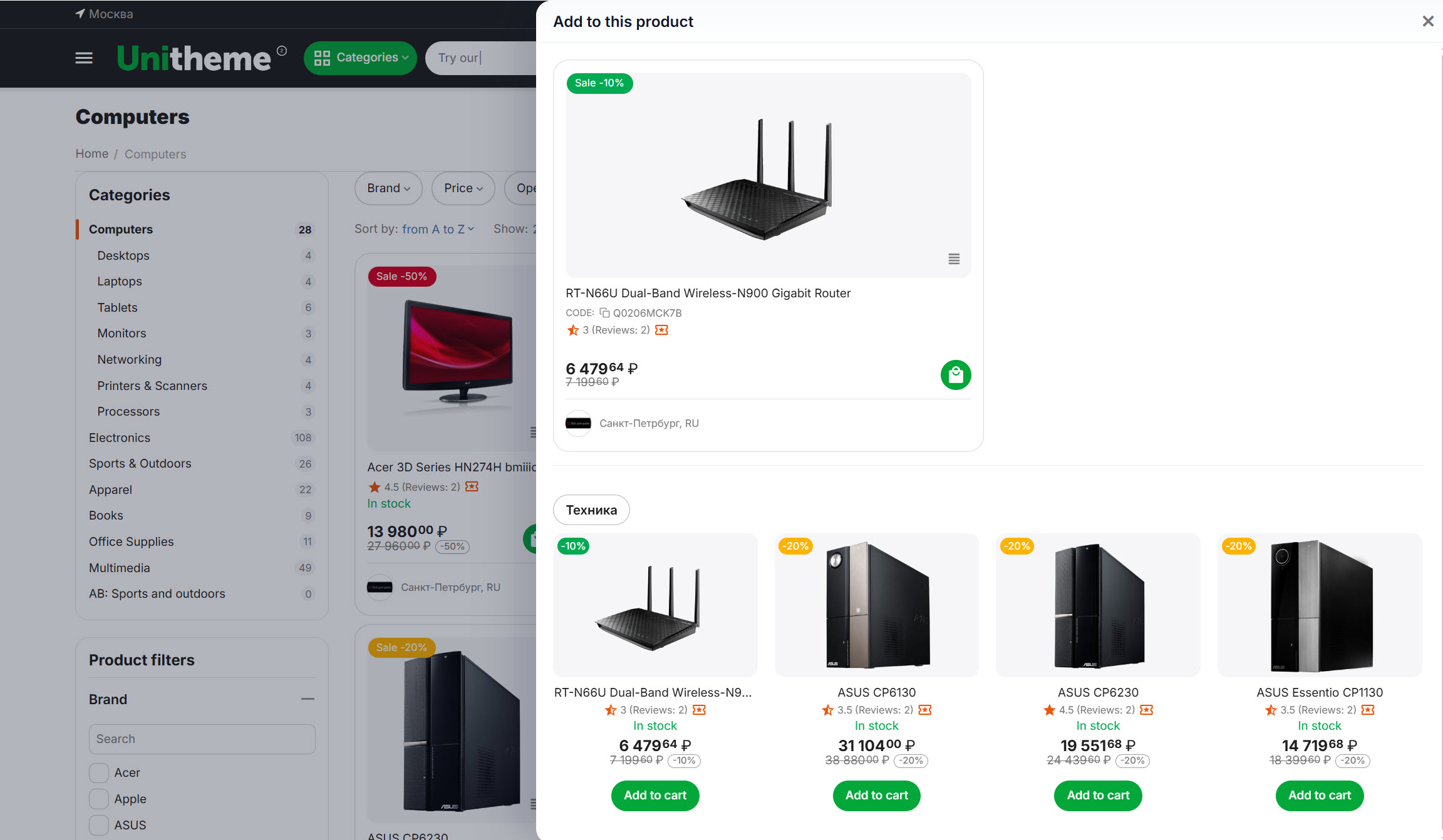
allows to display recommendations of the products based on the selection results in a pop-up window of approval to add the Reference product into the cart, as well as for the cart page where the Reference product was added.
-
uses a powerful system of background, actualization and caching of the selections (all selections are held in the background mode, recorded into the data base and are actualized in periodicity period with CRON). Add-on doesn’t create any load when the accessories are displayed even when several millions of products are shown.
linkCompatibility
| Available add-on version | CS-Cart/Multi-Vendor compatible versions |
|---|---|
v4.2.0 |
4.14.3 – 4.20.1 |
v3.2.1 |
4.10.1 – 4.15.2 |
v2.4 |
4.3.3 – 4.9.3 |
Add-on is compatible with the following Themes:
- YoupiTheme (compatible with correspond CS-Cart version);
- UniTheme2 (compatible with correspond CS-Cart version);
- Responsive.
linkSupport
General technical support conditions are available at this link (be sure to review these conditions, all solutions from the AlexBranding development team come with limited technical support).
In order to use our technical support, you need to:
- Log in with your order owner account on https://cs-cart.alexbranding.com;
- Go to the page My Account → Orders;
- Find the corresponding order with the problem add-on in the orders list and pass to its details;
- Find the “Support” link next to the corresponding add-on name (near you can find Documentation link also) and click on it;
- Fill in the data with the problem, provide access to your CS-Cart installation (path to the administration panel, admin mail, admin password + FTP access) and create a ticket (after you will create the ticket, you will receive an e-mail and a special code to track the ticket in the future);
- Wait for the specialist answer in accordance with the regulations of the technical support service and the priority of your ticket.
If you didn't receive an answer within the deadlines, according to the chosen ticket priority, send e-mail info@alexbranding.com with the ticket number, for which you did not receive an answer in time, and the team manager will solve the problem in compliance with regulations.
link Demo
You can test the addon work with admin access using our demo server Demos for CS-Cart solutions from Alexbranding by choosing it in Addons list or just follow the link.
linkRestrictions and warnings
We recommend to note general restrictions:
- All solutions from AlexBranding developers team require pre-installation of the AB: Addons Manager service addon. It is delivered free of charge and is responsible for such services: installation, upgrades, license verifications. Excluding this service addon usage is not possible;
- Addon files may have a closed (encoded) part, in which only a license check is located;
- The addon will work only on those domains, that are specified in the user's license. If you try to use the solution on CS-Cart installations, whose domains are not included in the license, the addon will be automatically turned off;
- Local installation is not possible, so that the addon works on the additional domain (subdomain), enter this domain (subdomain) in the Domain field, when ordering (or write to info@alexbranding.com) - adding technical domains for the developing or for testing is always free.
linkUsage
linkInstallation
After your order has been processed by our manager, it will be transferred to Completed state, you will receive an email to your mailbox with ordered add-ons license numbers (usually it takes from 15 minutes to 8 hours depending on the day time and week day).
Then follow the steps below, which differs depending on your version of the CS-Cart platform:
You can also install the add-on with a standard installation for CS-Cart. To do this, download the appropriate archive with an add-on version compatible with your version of the CS-Cart platform.
Go to the website cs-cart.alexbranding.com, log in under the account of the order holder and go to the page My Profile → Orders → Relevant Order, go to details and you will see a list of available archives for the ordered add-on. Download the version (archive) you need and make the installation (standard for CS-Cart installation: Add-ons → Downloaded add-ons and in the gearwheel menu select Manual installation).
linkSettings
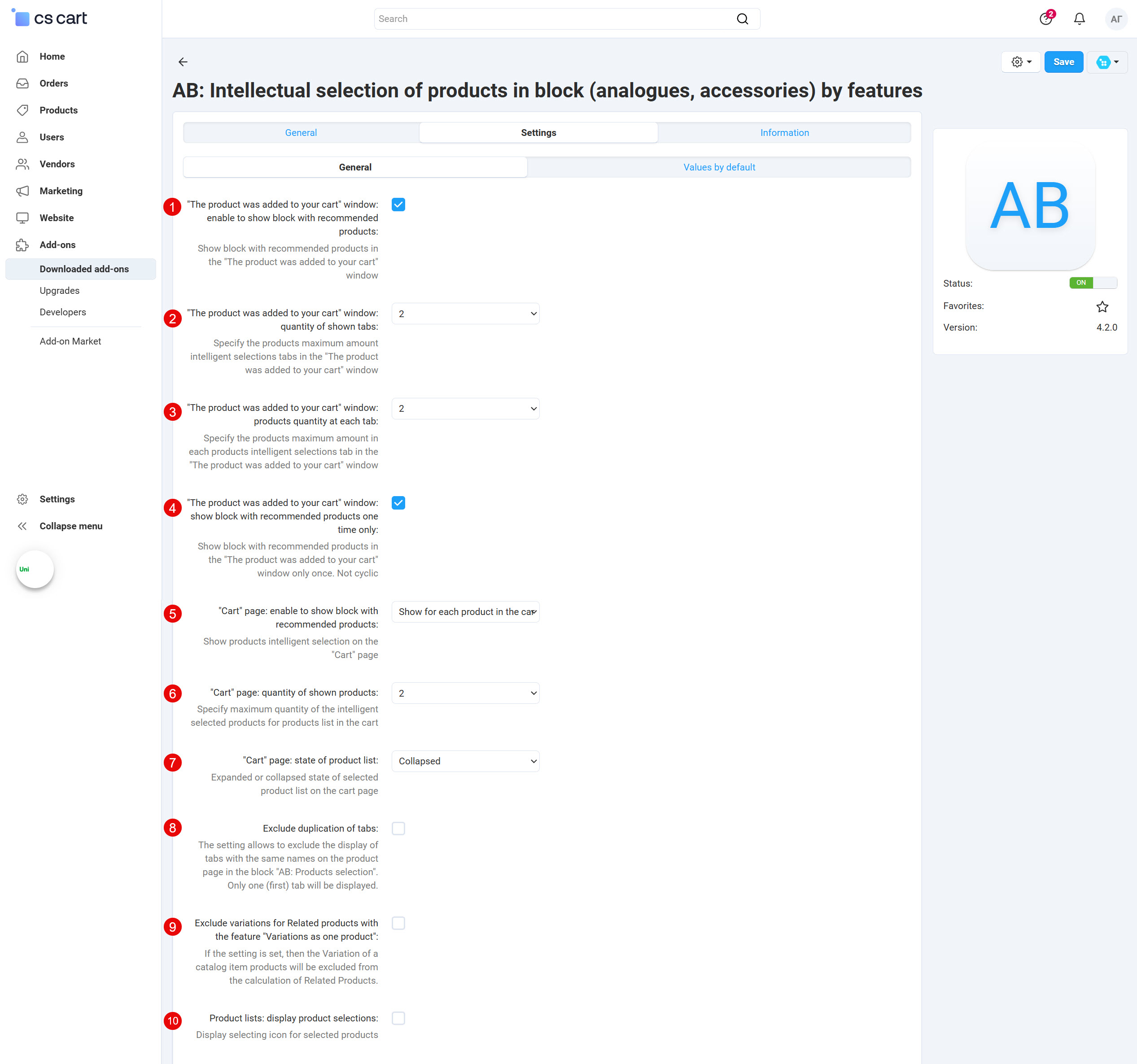
For access to the add-on settings you should go to the page Administration panel → Add-ons → Downloaded add-ons and at the add-on name select appropriate menu item.
linkGeneral
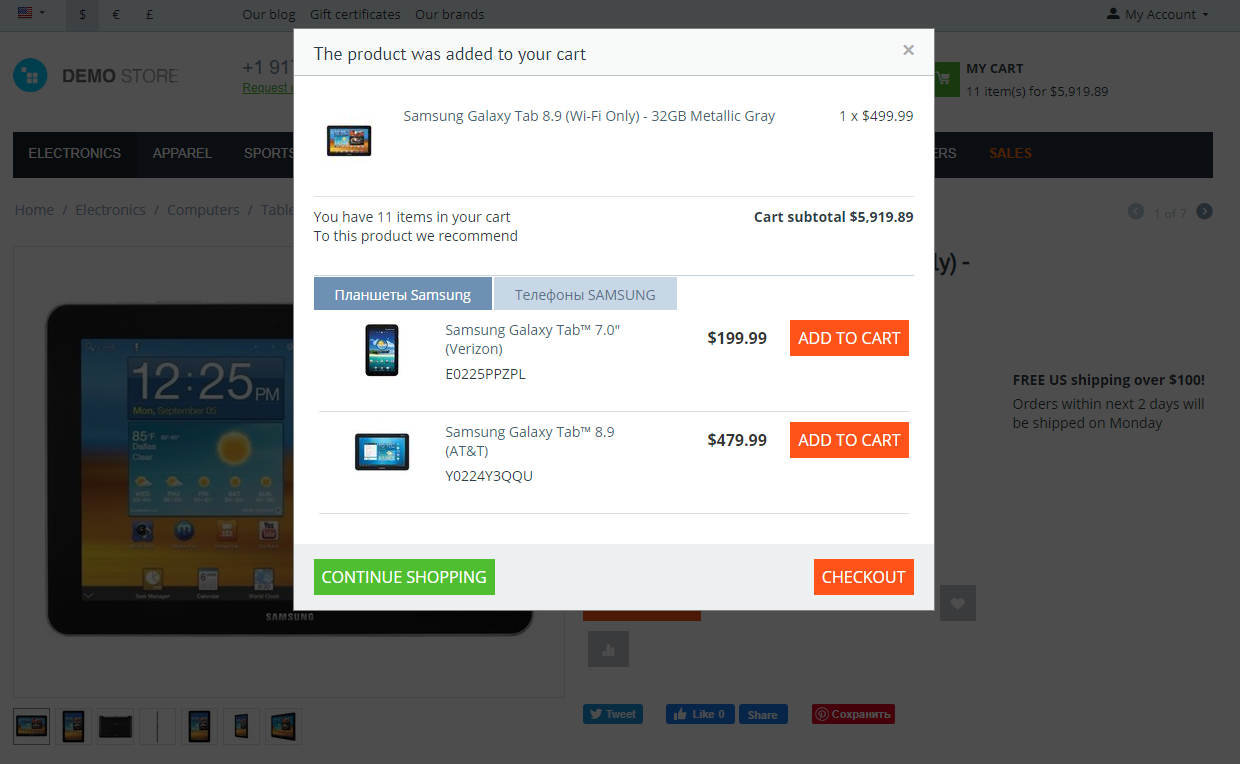
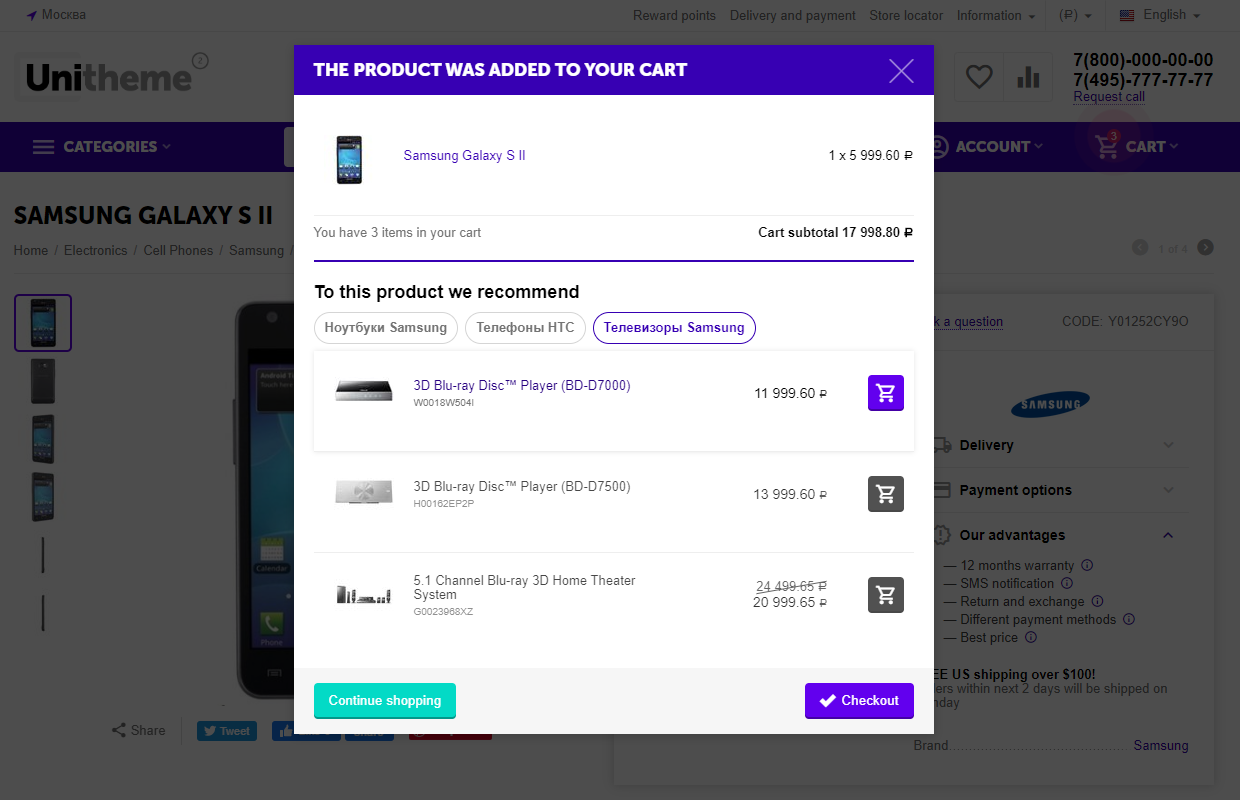
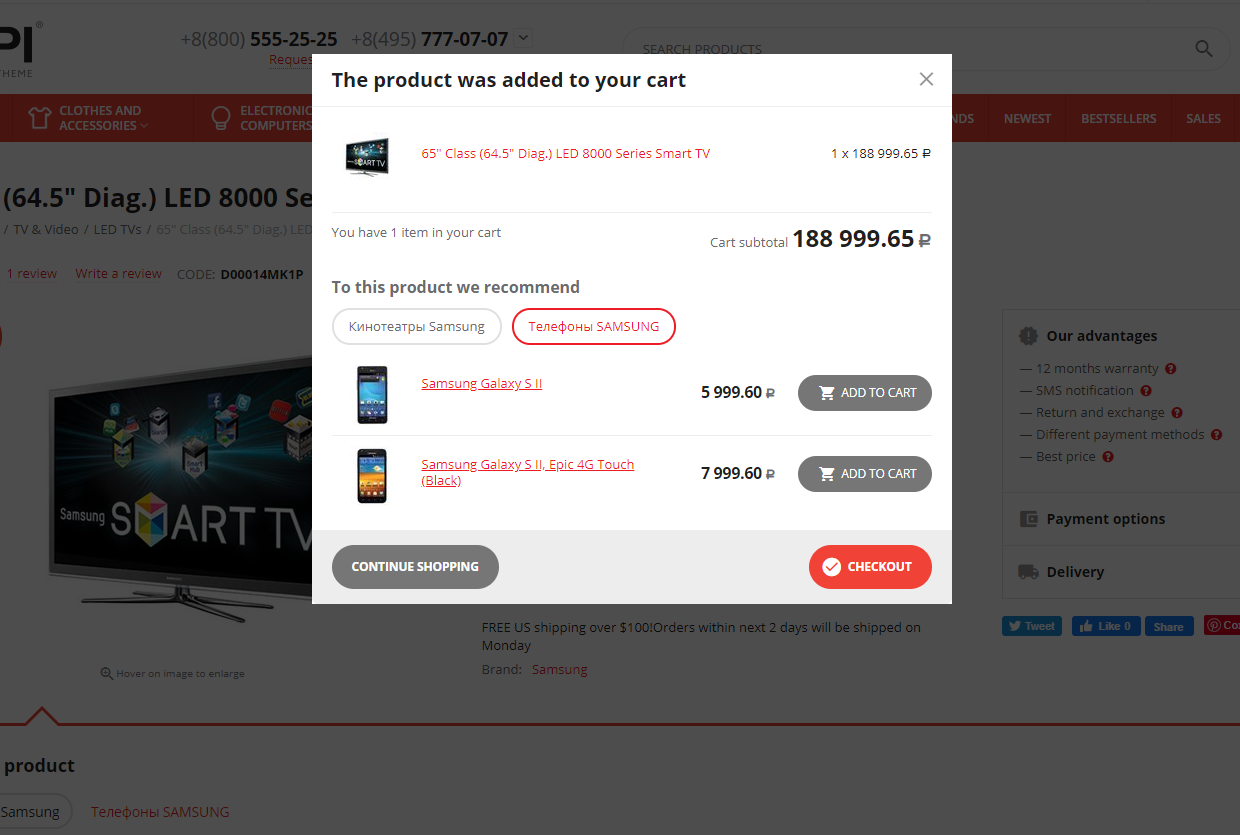
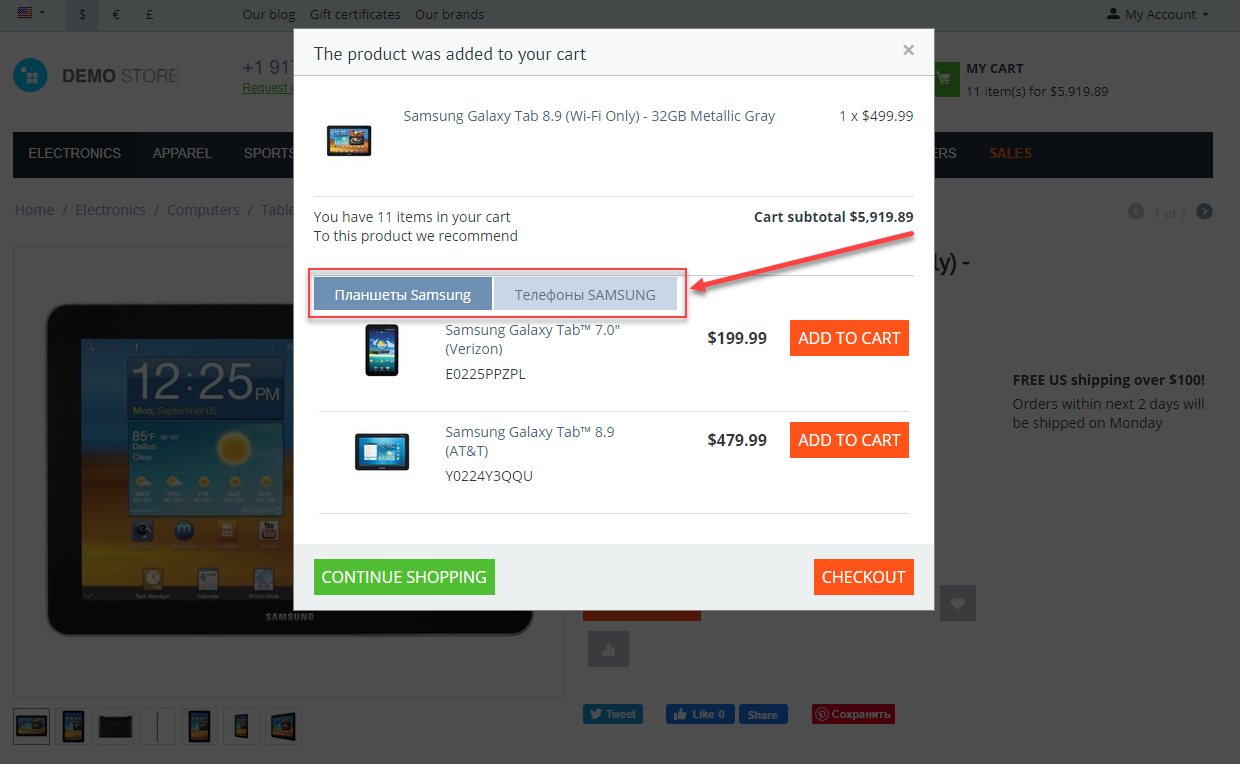
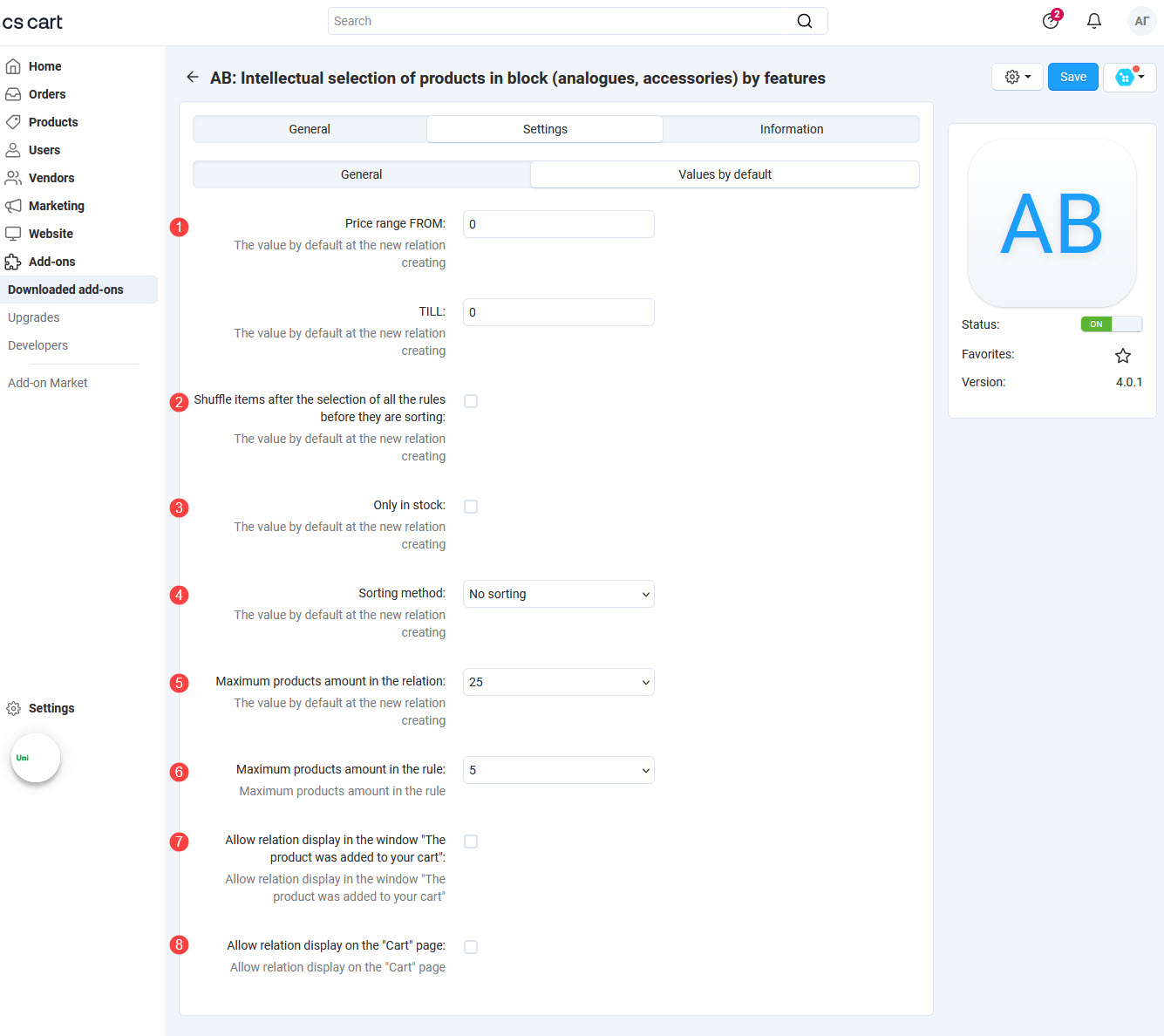
link3. Only in stock
_en.jpg "Settings for АВ: UniTheme2")
_en.jpg "Settings for АВ: YoupiTheme")
linkRelation and Rule creation (Basic information)
Before the Relation and Rule creation, you should think about products category and features that you want to display accessories for. For example:
-
Relation Tablets SAMSUNG. When opening the laptop with the manufacturer feature Samsung from the Electronics / Computers / Laptops category and its subcategories — display 5 first Samsung tablets, sorted by price ascendant;
-
Relation Phones SAMSUNG. When opening the laptop with the manufacturer feature Samsung from the Electronics / Computers / Laptops category and its subcategories — display 5 first Samsung phones, sorted by price descendant;
-
Relation Headphones. When open any notebook from the category Electronics / Computers / Laptops and its subcategories — display 5 first headphones, sorted by price descendant.
As a result must be next:
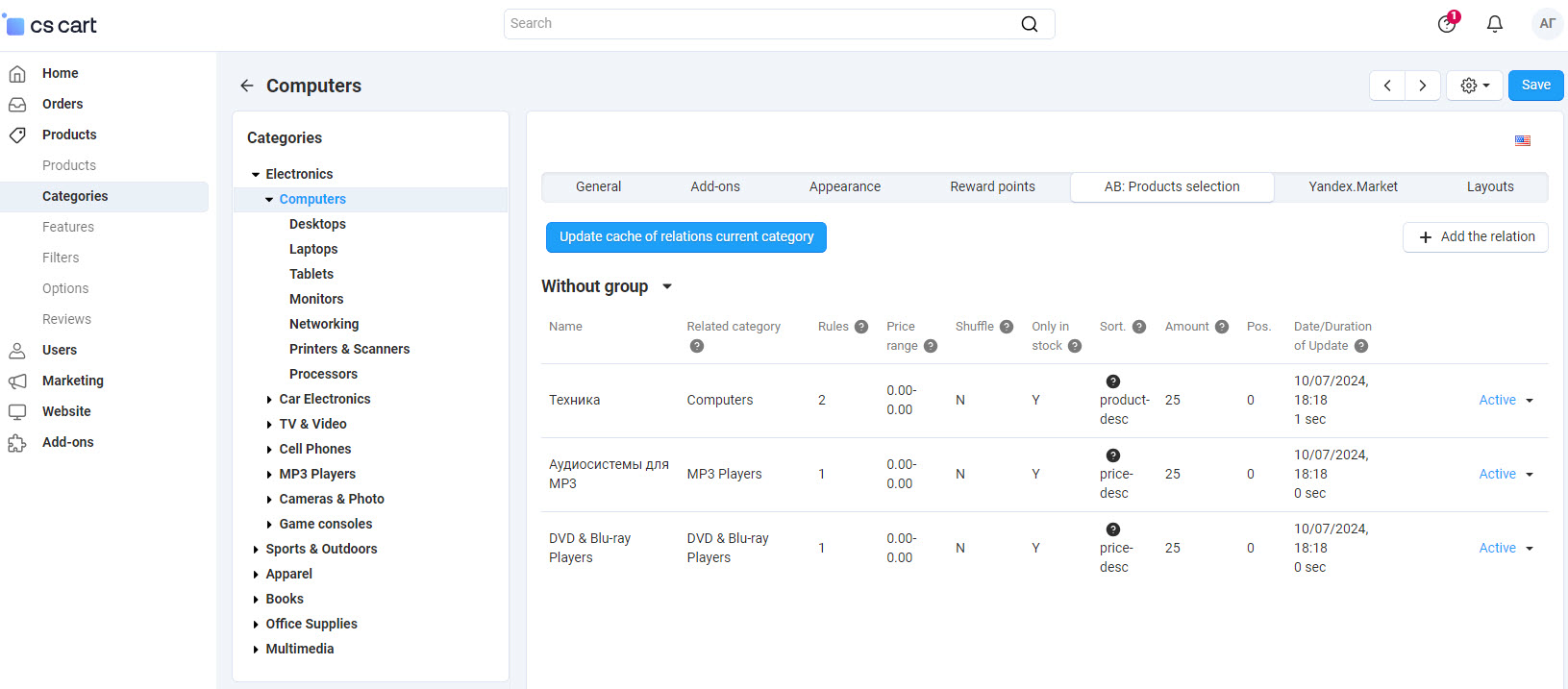
After saving the relation, you should create the matching rules (in unlimited number). The results for each rule are sorted in a specified way and then joined to the one products list.
If option Shuffle is set then first products will be joined to the one products list by all rules and then sorted in a specified way.
Used property types in rules:
- Filter type → Checkbox with the following available operators: In list, Not in list;
- Filter type → Number slider with the following available operators: Equal, Not equal, More or equal, Less or equal, In list, Not in list.
_en.jpg "Example of parent category")
If you wish you may duplicate Relation and its Rules. From the beginning duplicated relation will have a status Disabled. Edit necessary parameters, activate relation and click Update cache of relations to display it on the storefront.
linkRelation and Rule creation (Everybody should know)
To fill the block with the products automatically on the bases of relations and rules, use the following modes of products selection.
_en.jpg "Settings of the Relation page")
link1. Name
link4. Shuffle
link5. Only in stock
link8. Price range
link12. Amount
link13. Position
link14. Status
linkWork with relation groups by appointment
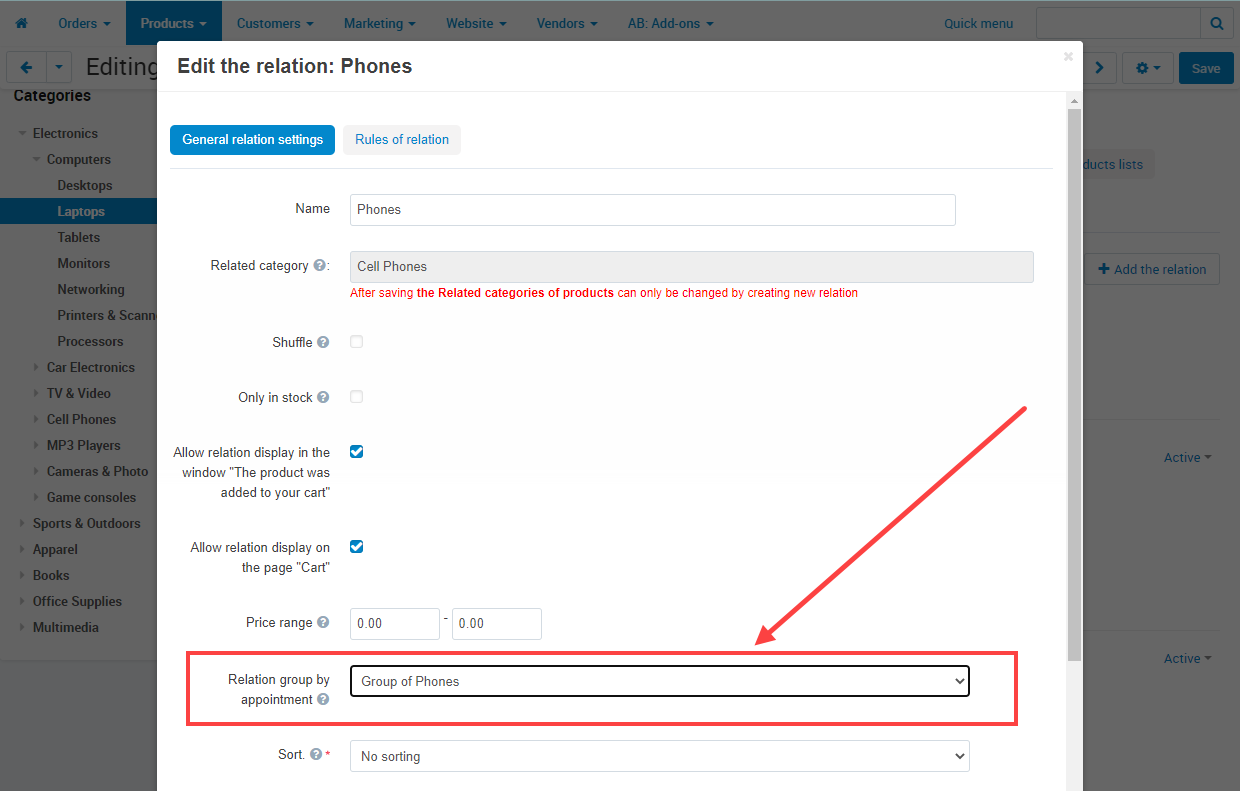
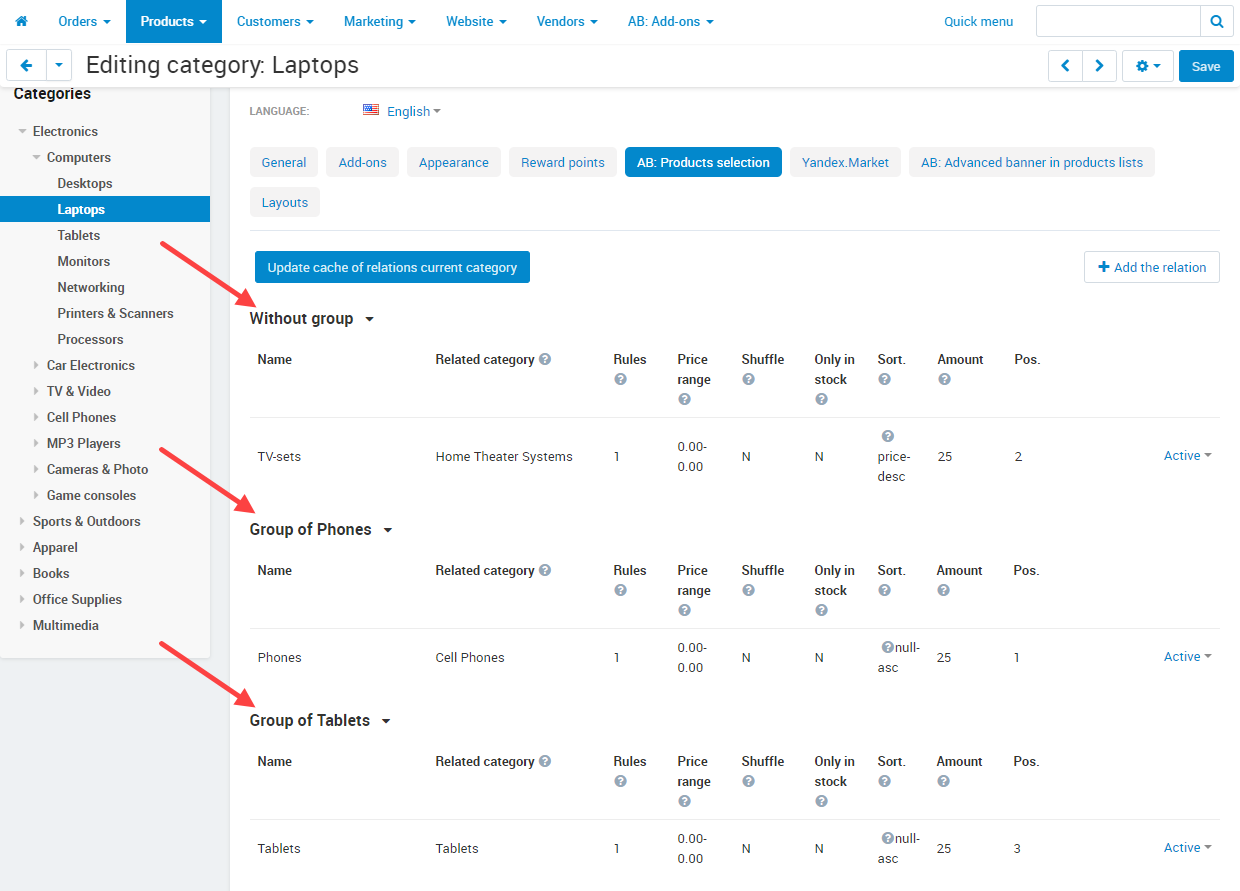
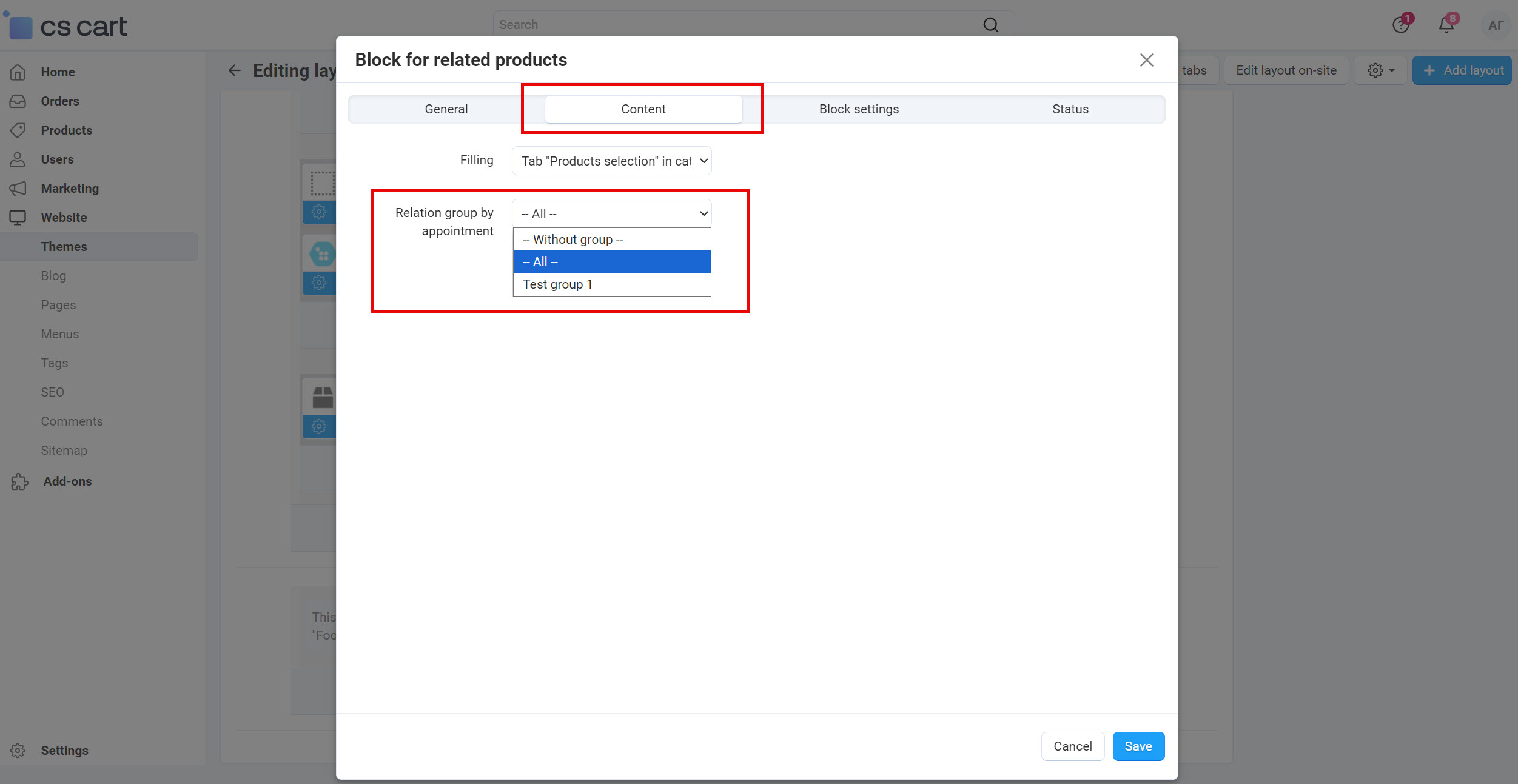
Add-on adds the possibility to group product relations by appointments as in one block, as in separate blocks on the product page.
_en.jpg "Page of list of relation groups by appointment")
linkData cache
The add-on is designed for the high-loaded web stores, therefore the data cache is created, for fast product displaying. It is necessary to update cache after updating or adding products or features, prices, etc. It can be done manually or automatically. You can specify the link cache lifetime or, in other words, the time in days at which the link cache will be automatically updated. For example, every 3 days. See add-on settings.
_en.jpg "Page \"Update cache of relations\"")
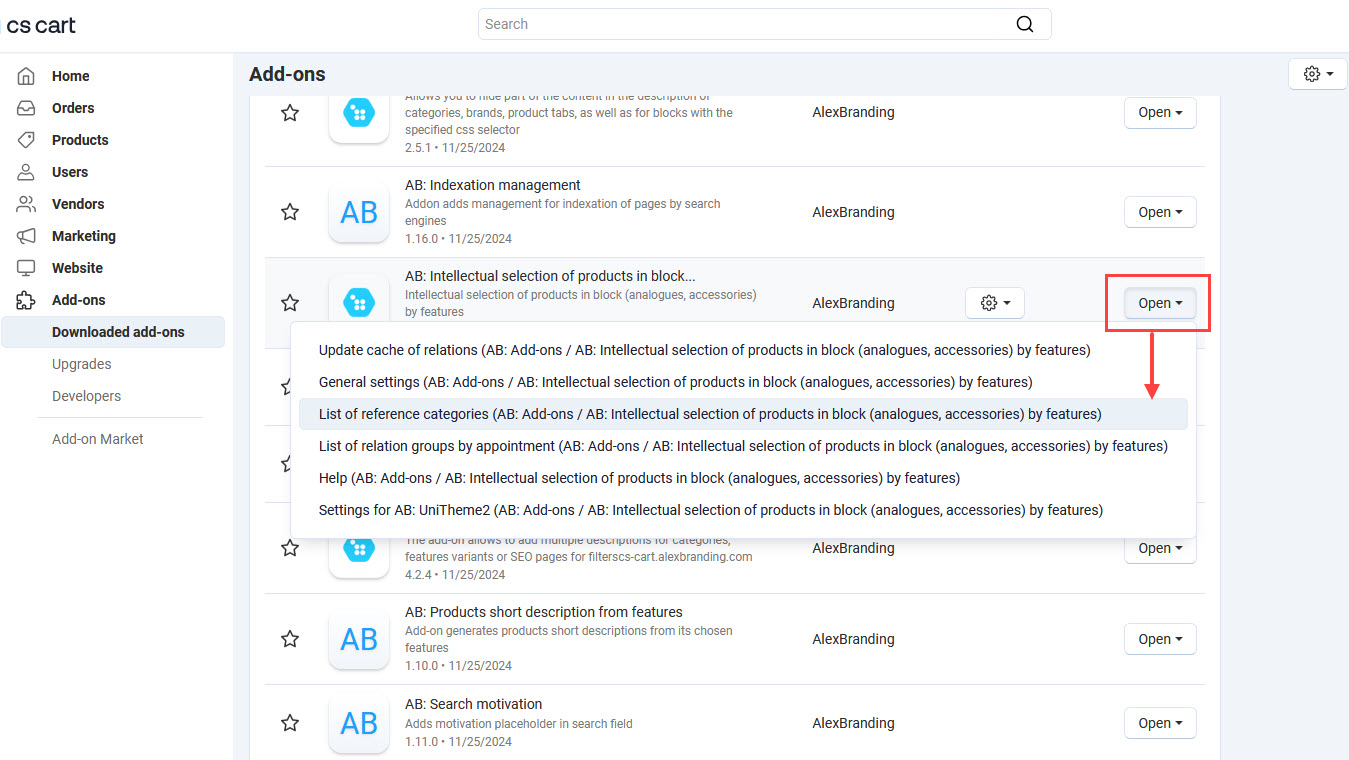
To update cache by Cron manually go to the page Administration panel → Add-ons → Downloaded add-ons and at the add-on name AB: Intellectual selection of products in block (analogues, accessories) by features in the gearwheel menu select the item Update cache of relations. On the opened page click the button Update cache of relations.
To update cache automatically, copy Cron command, specified on the page. Do not miss a chance to use a new parameter --limit, which can be used when forming the cache update command. If you have a lot of products and connections, then updating the cache for all connections at once can load the website for 100% and it will not work at all. Now, using this parameter, you can specify the number of updated links, for example 5. And in the scheduler, you can set the task for execution every 10 minutes, i.e. 6 times per hour. Therefore, in one hour you can update 6 times * 5 links = 30 links or 720 links a day and further in a circle. Such a distribution in quantity and time significantly reduces the load on the website. For example,
5 23 * * * php /path/to/admin.php --dispatch=ab__ia_data.cron_update_cache --limit=5 --switch_company_id=* linkFast search of Relations by all categories
For fast search of Relations by all site categories use the menu item List of reference categories:
linkIntegrations
 UniTheme2 - premium CS-Cart theme complex
 Extended "Buy together"Минимальная версия: 2.0.0
 Intellectual selection of products in block (analogues, accessories) by featuresМинимальная версия: 3.0.0
There are two methods to display product collections from the add-on ab__buy_together in UniTheme2:
- the output is carried out in the place provided in the theme on the product page (above or below the product tabs, etc.). Use the settings below to manage the display and behavior for this method;
- adding block for layout "Products" (this method is well described in documentation for add-on). To output in this way, do not use the settings below, the block has its own settings.
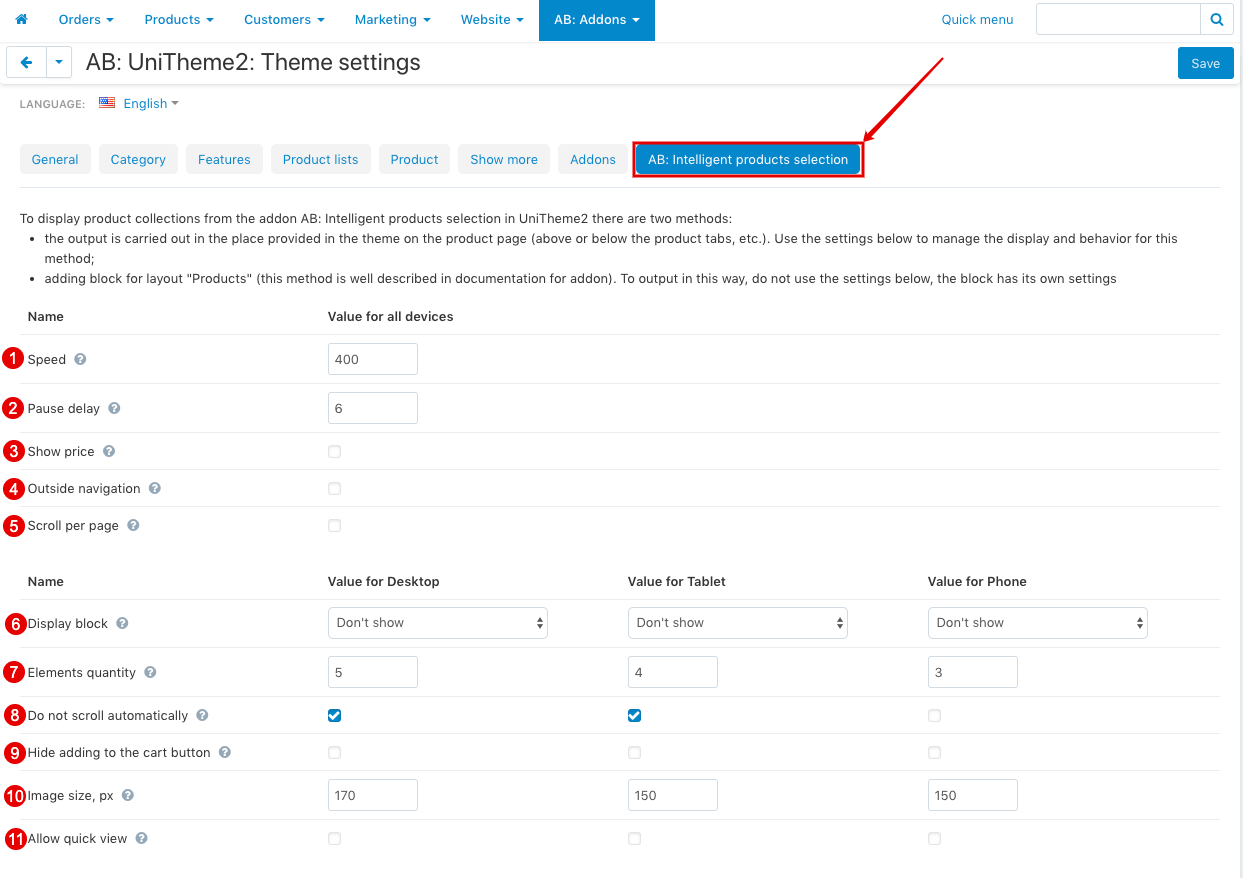
- Speed ‒ The setting determines the speed of the scroller.
- Pause delay ‒ Defines the time interval for the suspension of the scroller in the block with product recommendations.
- Show price ‒ The setting determines whether or not to show the price for products in the product recommendations block.
- Outside navigation ‒ Allows you to enable outside navigation for the scroller.
- Scroll per page ‒ Allows the scroller to scroll through not scrolling elements, but whole blocks.
- Display block ‒ Allows to choose how to display the block on the product page (separately for each type of device PC, Tablet, Phone). Possible values:
- Dont show;
- Before product tabs;
- After product tabs..
- Elements quantity ‒ Determines the number of products to display in the scroller (separately for each type of device PC, Tablet, Phone).
- Do not scroll automatically ‒ The setting determines the default behavior of the scroller (separately for each type of device PC, Tablet, Phone).
- Hide adding to the cart button ‒ The setting determines whether or not to add a product to the cart (separately for each type of device PC, Tablet, Phone).
- Image size, px ‒ The setting determines the size of the product image to display in the block (separately for each type of device PC, Tablet, Phone).
- Allow quick view ‒ Allows to display "Product quick view" button for products in scroller (separately for each type of device PC, Tablet, Phone).
Pay attention that integration of the add-on Extended "Buy together" and the theme UniTheme2 - premium CS-Cart theme complex provides an option of view of the block with product collections:
- The setting of view of tabs is located on the page UniTheme2 - premium CS-Cart theme complex → Color scheme settings → "General" tab → Tabs style.
- The setting of roundness of corners of block is located on the page UniTheme2 - premium CS-Cart theme complex → Color scheme settings → "General" tab → Round corners of blocks, windows, banners.
 YoupiTheme - premium theme for CS-CartМинимальная версия: 4.16.1.a
- Intellectual selection of products in block (analogues, accessories) by featuresМинимальная версия: 3.0.0
There are two methods to display product collections from the add-on ab__buy_together:
- the output is carried out in the place provided in the theme on the product page (above or below the product tabs, etc.). Use the settings below to manage the display and behavior for this method;
- adding block for layout "Products" (this method is well described in documentation for add-on). To output in this way, do not use the settings below, the block has its own settings.
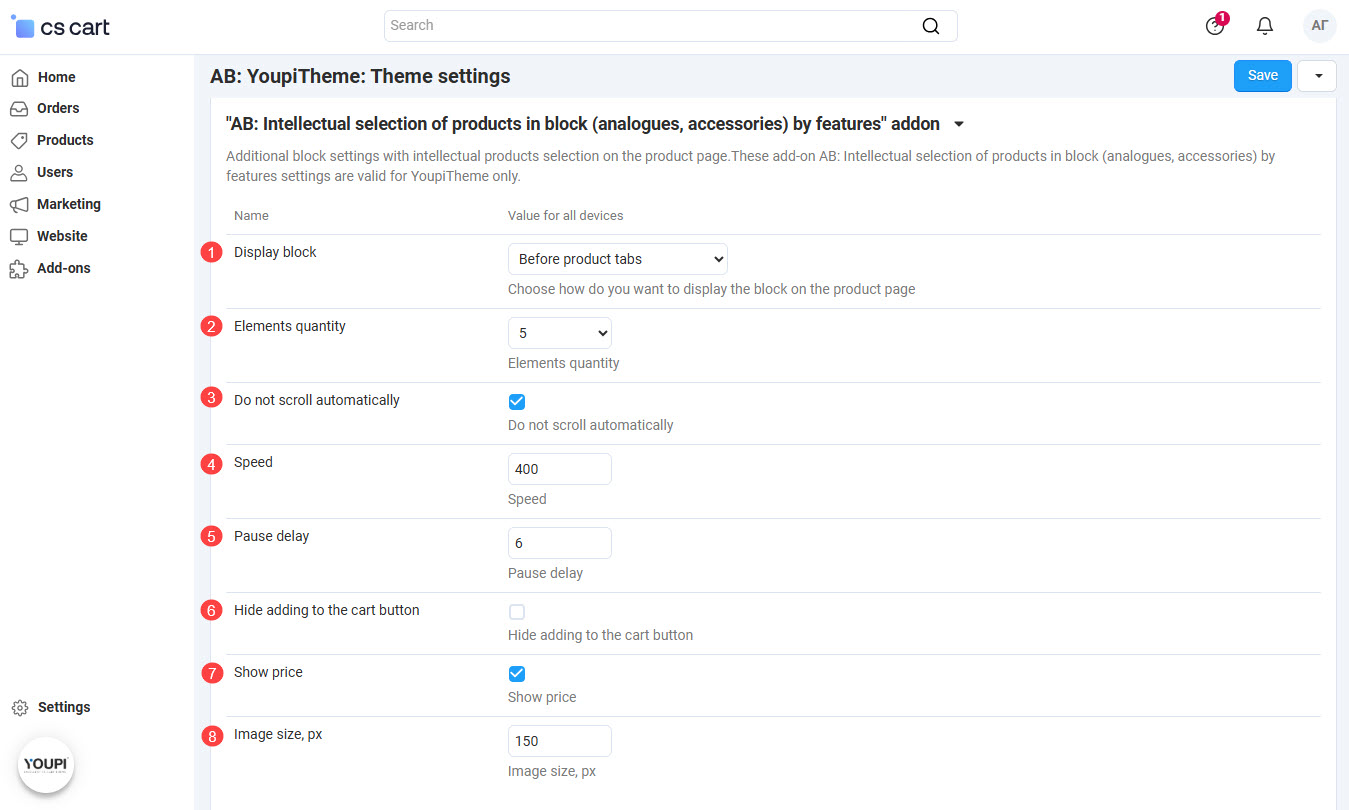
- Outside navigation ‒ Allows you to enable outside navigation for the scroller.
- Scroll per page ‒ Allows the scroller to scroll through not scrolling elements, but whole blocks.
- Display block ‒ Allows to choose how to display the block on the product page (separately for each type of device PC, Tablet, Phone). Possible values:
- Dont show;
- Before product tabs;
- After product tabs..
- Elements quantity ‒ Determines the number of products to display in the scroller (separately for each type of device PC, Tablet, Phone).
- Do not scroll automatically ‒ The setting determines the default behavior of the scroller (separately for each type of device PC, Tablet, Phone).
- Speed ‒ The setting determines the speed of the scroller.
- Pause delay ‒ Defines the time interval for the suspension of the scroller in the block with product recommendations.
- Hide adding to the cart button ‒ The setting determines whether or not to add a product to the cart (separately for each type of device PC, Tablet, Phone).
- Show price ‒ The setting determines whether or not to show the price for products in the product recommendations block.
- Image size, px ‒ The setting determines the size of the product image to display in the block (separately for each type of device PC, Tablet, Phone).
 Antibot
Blocks with recommended products will be displayed for real users only. They will be cut from source html-code for all bots.
- Extended "Buy together"Минимальная версия: 2.0.0
- Intellectual selection of products in block (analogues, accessories) by featuresМинимальная версия: 3.0.0
When the add-on Intellectual selection of products in block (analogues, accessories) by features is active, a new type of product combination is available.
This type of product combination allows to use products selection from the add-on Extended "Buy together". Thus, you can use already prepared product selections as accessories for more expensive products of your store. When creating this product combination Reference products will be used as the main products that are taken from each Additional product. It helps you to select already created product selection to create a new product combination.
_en.jpg "Select the value \"АВ: Products selection\" in the field \"Type\"")
When creating this combination, you won’t be able to select a base product. Instead of this Reference products will be used from relations of each Additional product. Thus, you may select already prepared products selection and your product combination will be ready at once.
Watch video of add-ons integration:
- Intellectual selection of products in block (analogues, accessories) by features
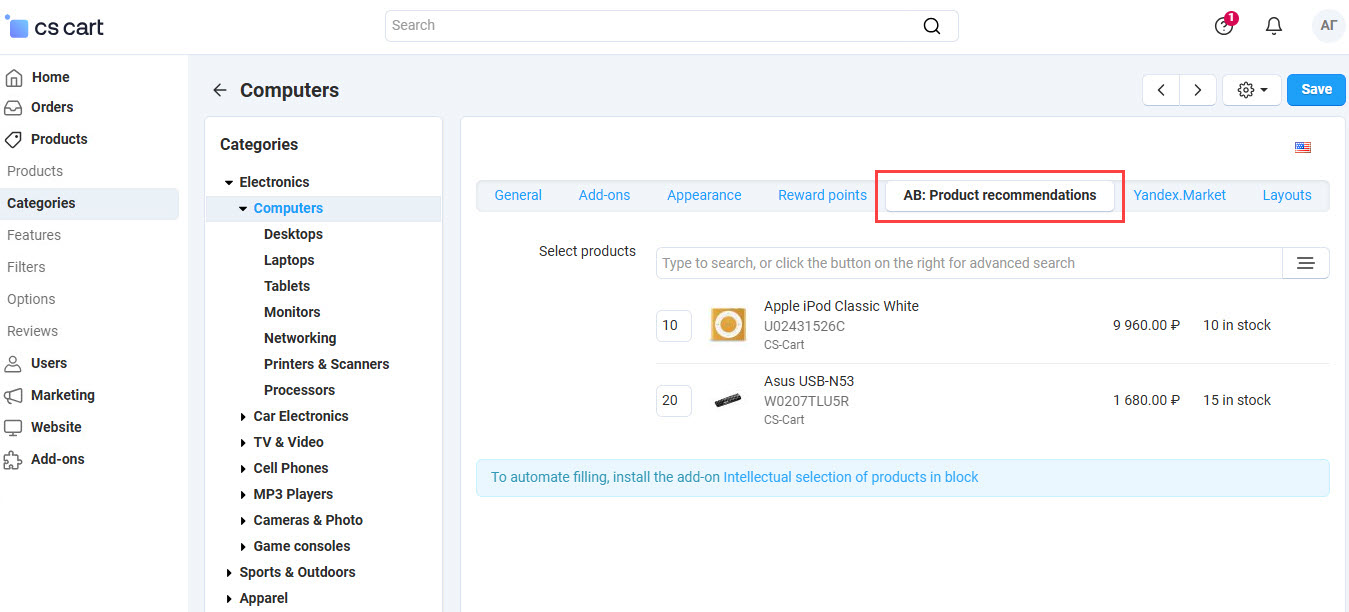
 Product recommendations in the customer's focus area
There is an ability to automate filling of recommended products. On the page Administration panel → Products → Categories → [category name] → "AB: Product recommendations" you can select a recommended product from intellectual selection of products. Thus, the first product from selection, that was made with the add-on Intellectual selection of products in block (analogues, accessories) by features, will be displayed on all product pages of the corresponding category, as a recommended one.
linkHow to update
AB: Add-ons Manager will notify you about available updates (you will see an indicator of new alerts). The recommended way is to update via the CS-Cart Upgrade center (a regular procedure of the platform). This method will allow lossless configuration of the transition to the new add-on version, that is guaranteed to be compatible with your CS-Cart platform version.
To make updates procedure:
- Go to the Administration panel → Settings → Upgrade center;
- Find the appropriate update among the available updates and click the Update button;
- Follow all the instructions, that will be shown during the upgrade procedure;
- Clear CS-Cart cache and start using new add-on version.
linkList of releases
Subscribe to our Telegram-channel to get info about new releases.
v4.2.0 from 04 May 2026
New features and improvements:
[+] Added ability to display selected products on the category page with the template "Grid".
For more details, please, refer to the documentation.
[+] Added a new setting "Cart" page: state of product list", that allows to fix a state of selected products on the "Cart" page.
For more details, please, refer to the documentation.
Functionality changes:
[*] UniTheme2. Appearance of tabs in the pop-up window "Product has been added to cart" was adapted to theme appearance.
[*] The setting "Cache update every" has been removed.
v4.1.0 from 04 November 2025
New features and improvements:
[+] Fundamentally increased the speed of relations generating.
[+] Added a variant "All" for the setting of poroduct block "Relation group by appointment".
Functionality changes:
[*] Improved display of product recommendations in the cart and in the pop-up window "Added to the cart".
Bug fixes:
[!] Relations were not generated for hidden basic products. Fixed.
[!] "Product recommendations in the customer's focus area" add-on. During product inheritance from category, for which the relation is selected, the error has occurred without cache generating. Unnecessary requests could appear for cache generating, that created additional loading. Fixed.
[!] The setting of product block "Relation group by appointment → Without group" has displayed all relations (with groups as well as without). Fixed.
[!] UniTheme2. Title of the page has been changed on "Not found" after adding a recommended product to the cart.
v4.0.2 from 01 May 2025
New features and improvements:
[+] Tabs view were adapted to UniTheme2 4.18.3b.
Functionality changes:
[*] UniTheme2. The theme setting "Allow quick view" was disabled for mobile devices.
Bug fixes:
[!] CS-Cart Ultimate. The list of supporting categories has displayed categories of the whole store, independently from the selected storefront. Fixed.
[!] When updating the cache of links with no products, the data of the last update could not be updated. Fixed.
[!] Setting of the link "Price range" during the product selection has rounded up to a whole number. Fixed.
v4.0.1 from 09 October 2024
New features and improvements:
[+] Added hooks to the templates and functions to extend work of the add-on.
[+] Added view of a date and duration of the last update.
[+] Added ability to generate separate relations.
v4.0.0 from 24 August 2023
Release video:
New features and improvements:
[+] Added new operators for features.
[+] For the block “AB: Products selection” added additional display templates.
[+] Added ability to copy rules.
Functionality changes:
[*] In Administration panel in the rule list, feature name for the storefront has been changed on the name for administration panel.
[*] Improved visibility on the cart page.
[*] UniTheme2. In the pop-up window “The product was added to your cart” effect of the grey color has been removed from selected products.
[*] UniTheme2. Appearance of tabs has been brought into conformity with the theme.
Bug fixes:
[!] Sorting by position has been ignored. Fixed.
[!] Products have not been linked through the feature with a filter type “slider”. Fixed.
[!] UniTheme2. In the pop-up window “The product was added to your cart” the button “Added to cart” has not been working when the theme setting “Allow to select variations\options from lists” was active on mobile devices. Fixed.
[!] UniTheme2. In the pop-up window “The product was added to your cart” tabs have been displayed with a different height on mobile devices. Fixed.
[!] CS-Cart Multivendor. “General products for vendors” add-on. Selected general products have not been added to the cart when the setting “Buy a default common product” was disabled. Fixed.
v3.2.2 from 01 June 2022
Bug fixes:
[!] UniTheme2. When there was a large number of tabs, text in these tabs has been displayed not total on mobile devices. Fixed.
[!] On CS-Cart version 4.15.1 picker erroe has occured. Fixed.
v3.2.1 from 08 September 2021
Bug fixes:
[!] Cache of relations was not generated if relation status was "Hidden". Fixed.
v3.2.0 from 03 September 2021
New features and improvements:
[+] Added possibility to clone relations.
Functionality changes:
[*] YoupiTheme. Add-on settings were removed to "Add-ons" tab.
[*] Removed add-on setting "Cron key". Cron task is available for the fulfilment at console mode only.
Bug fixes:
[!] Error could occur when generating categories with a large amount of products. Fixed.
[!] In the window "Product added to the cart" tab of matched products could be displayed without products. Fixed.
v3.1.3 from 01 June 2021
New features and improvements:
[+] "AB: Antibot" add-on. Blocks with recommended products will be displayed for real users only. They will be cut from source html-code for all bots.
v3.1.2 from 13 April 2021
Bug fixes:
[!] Fixed compatibility with YoupiTheme v4.12.2.d.
v3.1.1 from 27 January 2021
Pay attention
If you are using YoupiTheme, please upgrade it to version 4.12.2.a or higher.
New features and improvements:
[+] YoupiTheme. Added display of the block with products selections after product tabs.
Bug fixes:
[!] UniTheme2. On the cart page and in the window of adding to cart, view of tax broke the make-up. Fixed.
[!] UniTheme2. On the product page the make-up of the block with products selection was broken when the template “The big picture” was chosen and there was a large number of tabs on mobile devices. Fixed.
v3.1.0 from 15 November 2020
Release video:

New features and improvements:
[+] Added the ability to set links at tabs of products selection block.
Bug fixes:
[!] On Ultimate edition cache reset occurred for all storefronts when resetting cache of relations for one storefront only. Fixed.
[!] YoupiTheme. Outside navigation elements of the block were displayed incorrect. Fixed.
v3.0.0 from 30 October 2020
Release video:

New features and improvements:
[+] Added the ability to combine links into Relation groups. On the storefront on the product page you can display several blocks "AB: Products selections" with contents by Relation groups.
[+] YoupiTheme. Added theme setting "Display block" on the page "AB: Add-ons → AB: AB: Intellectual selection of products in block → Settings for the AB: YoupiTheme".
v2.9.0 from 26 March 2020
New features and improvements:
[+] Responsive: Added caching of the block "AB: Products selection”.
[+] Added new setting “Administration panel → Manage add-ons → AB: Intelligent products selection → Exclude duplication of tabs”. If the product has several links with the same name (created in different categories), then using this setting you can leave only one link/tab in the block "AB: Products selection" on the product page.
[+] Added parameter --limit, which can be used when forming the cache update command. If you have a lot of products and connections, then updating the cache for all connections at once can load the website for 100% and it will not work at all. Now, using this parameter, you can specify the number of updated links, for example 5. And in the scheduler, you can set the task for execution every 10 minutes, i.e. 6 times per hour. Therefore, in one hour you can update 6 times * 5 links = 30 links or 720 links a day and further in a circle. Such a distribution in quantity and time significantly reduces the load on the website. For example, 5 23 \* \* \* php /path/to/admin.php --dispatch=ab__ia_data.cron_update_cache --cron_key=\* --switch_company_id=\* --limit=5.
Functionality changes:
[*] Unitheme2: Add-on settings for theme were transferred to the tab "Add-ons" on the page "Add-ons → AB: UniTheme2 → Theme settings".
[*] The add-on setting "Cache features variants when creating rules" was removed.
[*] Informational content was improved during the rule testing.
Bug fixes:
[!] Add-on “Products variations”: On the product page, when viewing product variations (the goal of the “Variations as one product” characteristic), the block “AB: Products selection” was not displayed. Fixed.
[!] In the window "The product was added to your cart" and on the cart page there were already added products to the cart in the products selections. Fixed, products will be excluded.
[!] On the product page with zero balance in the "AB: Products selection" block the tab of relation was not displayed when the "Only in stock" setting was active. Fixed.
[!] When creation/editing the Reference categories by features, list of the feature variants is formed from all products of Reference category. If the Reference categories had no any product then features variants were unavailable. Fixed. Now the list of the feature variants is formed from the products of Reference categories and its subcategories.
[!] Sorting of products in the block "AB: Products selection" did not match the specified in the "Relation" settings. Fixed.
v2.8.0 from 21 November 2019
Functionality changes:
[*] "Exclude product variations" setting was renamed on "Exclude variations for Related products with the feature "Variations as one product" and accordingly changed its functional behavior;
Bug fixes:
[!] When viewing the saved relation Rule, the comparison operator "Equally" was not displayed. Fixed;
[!] If the condition for Related products contained"--- variant of [Reference product] ---", but at the same time this feature was not assigned to the Reference product, the rule was fulfilled according to the remaining conditions. Fixed. Now the Related product must contain all the conditions from the rule for “Related Products”, otherwise the rule is completely ignored.
v2.7.0 from 12 November 2019
New features and improvements:
[+] MULTIVENDOR: Added compatibility with the "Common Products for Vendors [Beta]" addon;
[+] In the edit window "Relation" in the tab "Rules of relation" for "RELATED PRODUCTS" using condition for products selection "with next features" its possible to set "--- variant of [Reference product] ---". This option allows you to automatically take into account the value of the corresponding features of the Reference product when selecting Related products;
[+] For "CRON key" setting automatic code generation added.
Bug fixes:
[!] ULTIMATE: In "AB: Products selection" block Relations from another storefronts were shown. Fixed;
[!] On the cart page, if the product has a block "Recommended products" automatic recount of the cart did not work. Fixed.
v2.6.0 from 02 September 2019
New features and improvements:
[+] Connector for next upgrades through the UpgradeCenter is added;
[+] New option "Exclude products variations" is added;
[+] Settings tab for Unitheme2 is added;
[+] Option with image size is added;
[+] In the administration panel additional points is added to the "AB: Addons" menu;
[+] Form for UniTheme2 template is added.
Bug fixes:
[!] Compatibility with UniTheme2 is added;
[!] Pre settings at displaying as a block are deprecated.
v2.4 from 14 June 2018
https://cs-cart.alexbranding.com/en/ab__intelligent_accessories.doc
v2.3 from 23 January 2018
https://cs-cart.alexbranding.com/en/ab__intelligent_accessories.doc
v2.2 from 24 December 2017
https://cs-cart.alexbranding.com/en/ab__intelligent_accessories.doc
v2.1 from 01 December 2017
https://cs-cart.alexbranding.com/ab__intelligent_accessories.en.doc
v2.0 from 17 October 2017
https://cs-cart.alexbranding.com/ab__intelligent_accessories.en.doc
v1.21 from 06 March 2016
[!] исправлено объявление констант
[!] исключена автоматическая генерация кеша при сохранении связи
v1.2 from 28 February 2016
[+] en добавлен параметр сron_key для защиты от несанкционированного запуска планировщика
[+] en добавлен параметр, который позволяет автоматически обновлять кеш связей каждые N дней.
[+] en для опорных и связанных товаров, теперь можно не указывать характеристики, а просто связать категория на категорию.
[+] en добавлены новые языковые переменные, чтобы не использовать системные, так как в разных магазинах они могут быть изменены вручную.
[+] en при выборе характеристики, в момент создания правила, ее варианты буду кешироваться. Поэтому при повторном выборе характеристики не нужно будет ожидать списка вариантов. Если все же необходимо принудительно загрузить новый список варинатов - удерживайте клавишу Ctrl, при клике на характеристику.
[!] en исправлена работа скроллера с внешними кнопками навигации
[!] en из связанных товаров исключается опорный товар (случай когда одна и та же категория выступает одновременно и опорной и связанной)
[!] en исправлено значения по умолчанию "Максимальное кол-во отображаемых товаров в связи" при создании новой связи.
[!] en исправлен расчет кеша связей; оптимизированы запросы к базе данных.
v1.1 from 09 February 2016
[+] en добавлена возможность редактировать связь и правила связи на отдельной странице.
[!] en добавлено уведомление о попытке сохранить связь без имени. Это не допускается, поэтому связь не будет сохранена вообще.
v1.0 from 07 February 2016
[+] en добавлена справка по модулю
[+] en добавлена страница, со списком ОПОРНЫХ категорий
[+] en реализация подбора товаров по характеристикам