
linkOverview
linkFeatures
linkGeneral information
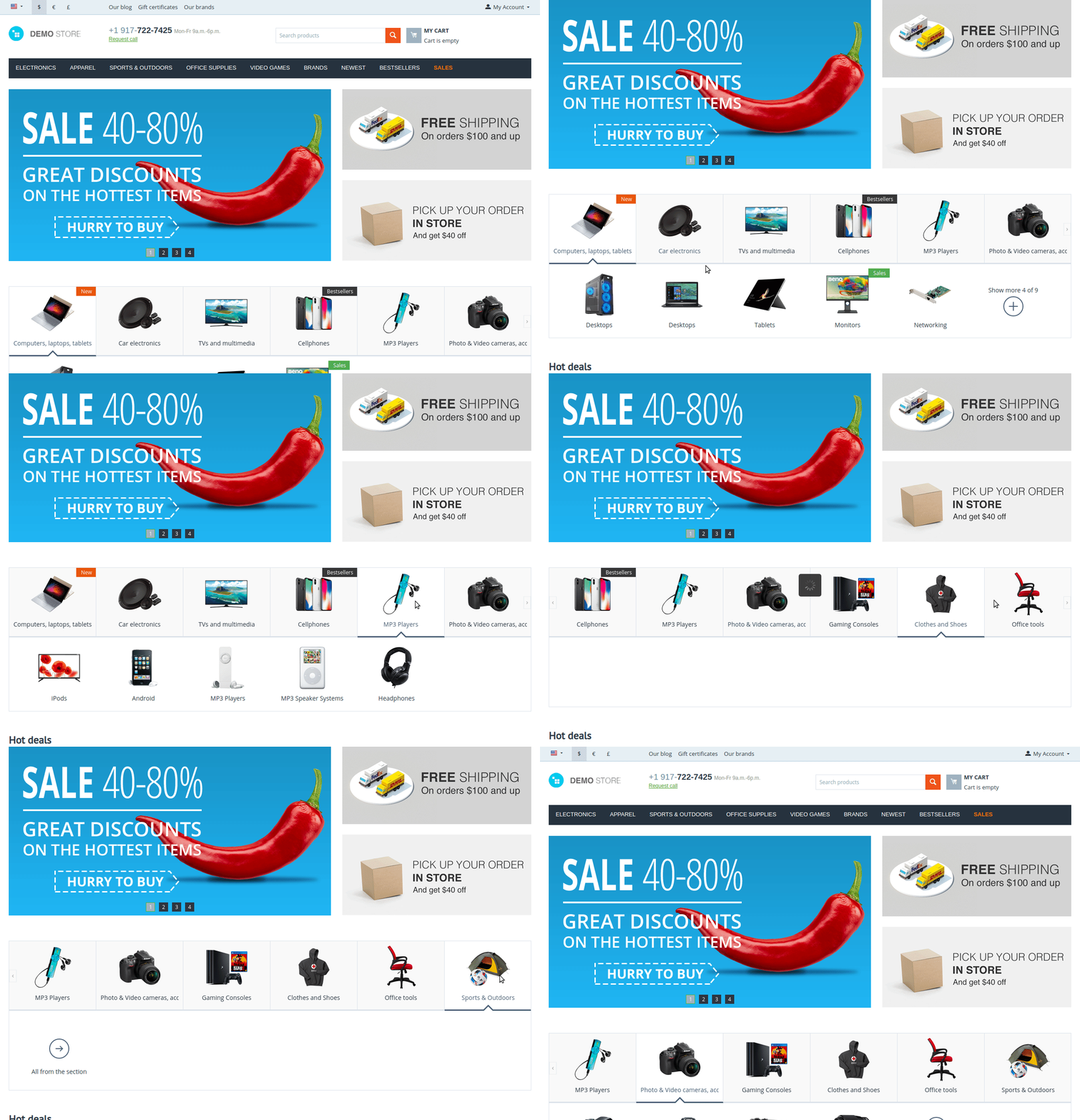
Allows to add the AB: Fast navigation block on different site pages for direct access to selected categories, subcategories, pages.
What is the mechanics of the fast navigation addon:
- The addon adds the possibility to create on any page an extra block with visual navigation by the required pages (the structure source can be any menu you create in the system CS-Cart — hence full flexibility with the ability to show any structure on any store page);
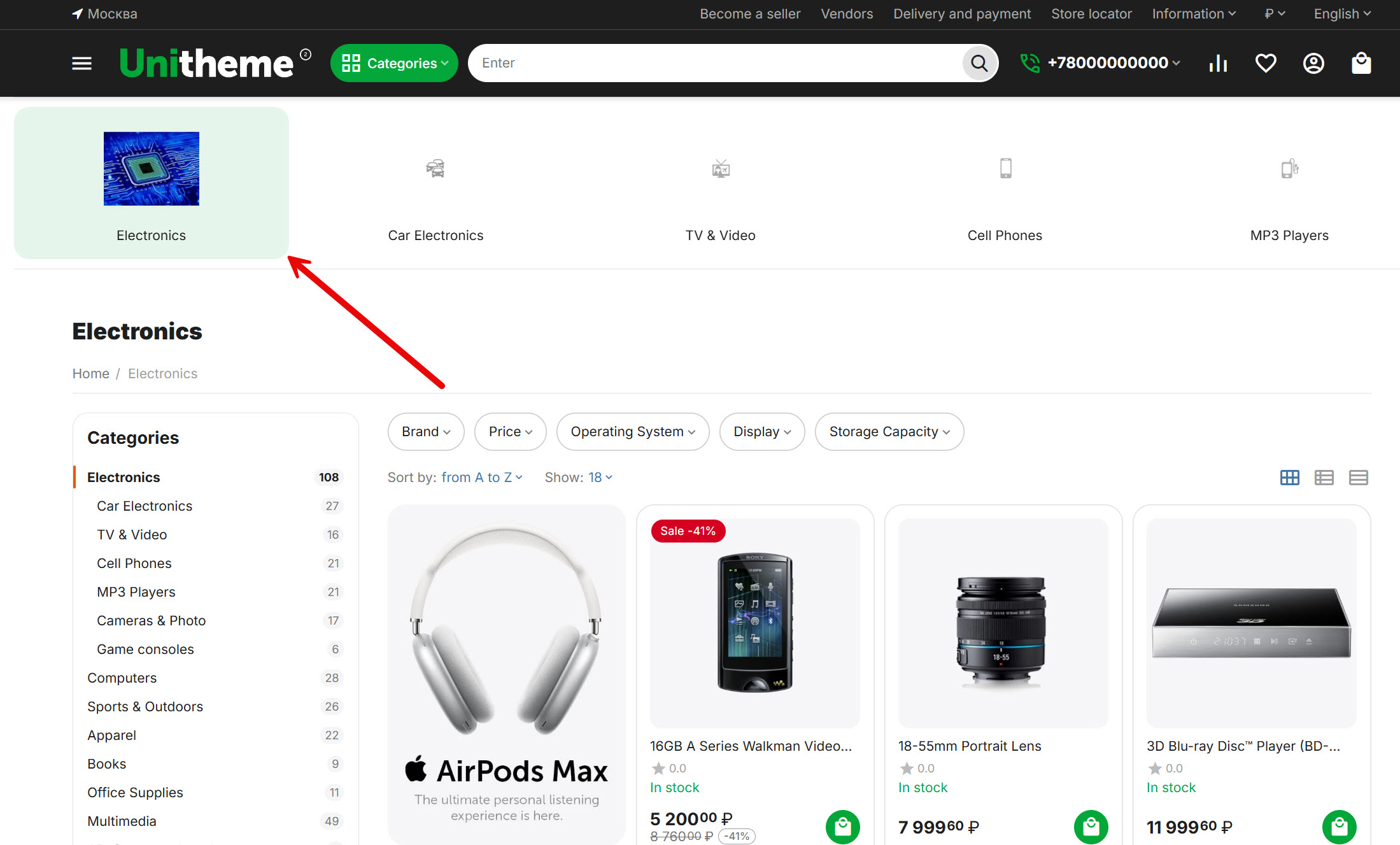
- The added block has an elaborate user interface with the ability to display single-level or two-level structures;
- When loading a block on the page, image lazy load is using (adds dynamic, pays users attention);
- Addon allows to upload demo data (Menu with test structure, images, settings, etc. already created and configured by the developers, which is simply enough to specify in the block content tab to get the displaying, like in demo);
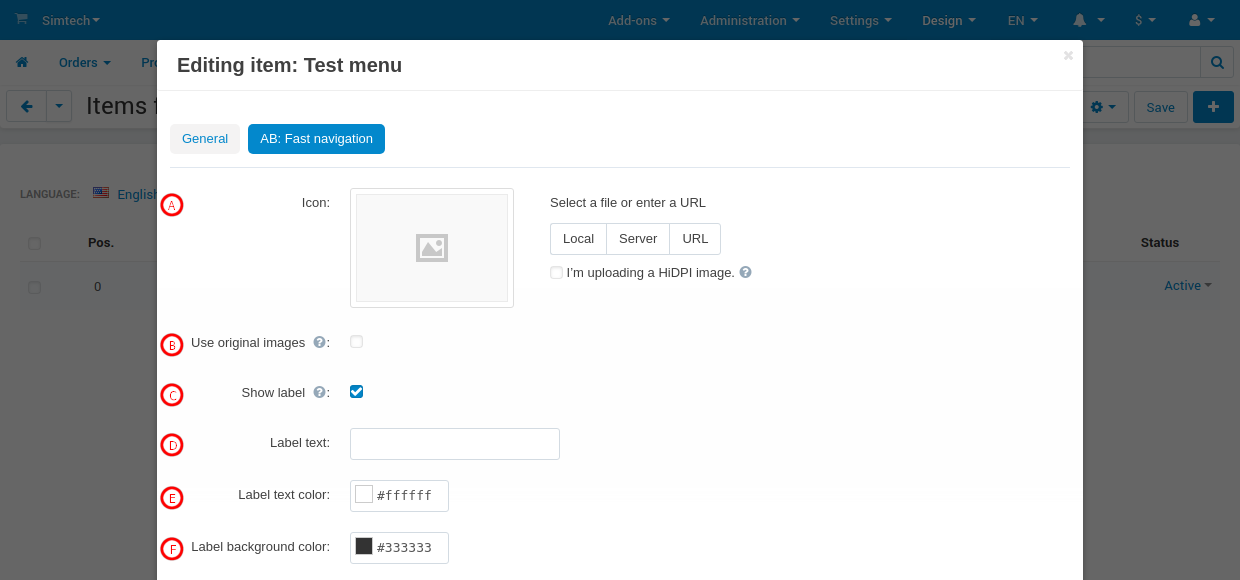
- Ability to assign an image and label to each point;
- Ability to control the columns number to show structure elements (for different devices separately);
- Ability to connect a scroller to show the structure with scrolling of the first or second level elements;
- Ability to connect scrolling indication of structure elements;
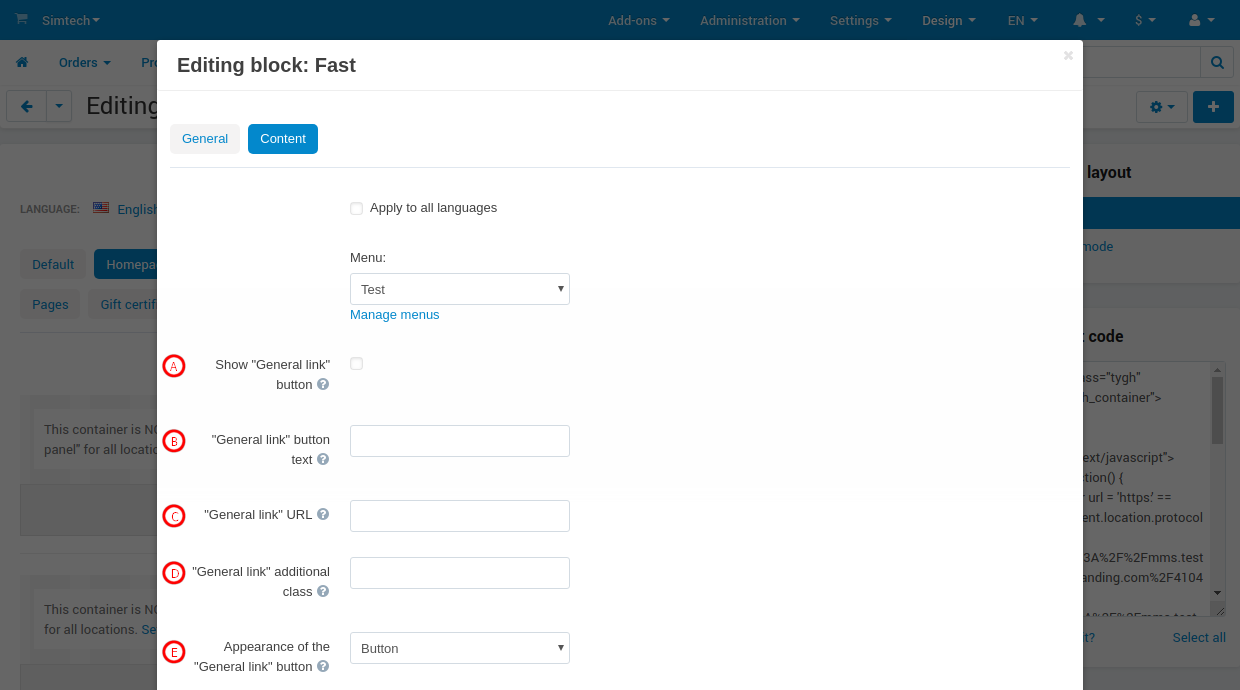
- Ability to add a custom link to each created Show all block (with link and link text management).
Addon solves several web-store problems at once:
- Improves the viewings depth (behavioral indicator affecting search engine ranking);
- Allows flexible allocation of weight to required sections (pages) of the store (even if it is not a categories pages, but filters, brands or products pages) from the home page or any other landing pages;
- Repeatedly improves usability for mobile users, which strongly affects conversion rates.
linkCompatibility
| Available add-on version | CS-Cart/Multi-Vendor compatible versions |
|---|---|
v1.12.0 |
4.12.1 – 4.20.1 |
v1.8.0 |
4.11.1 – 4.11.5 |
v1.4.0 |
4.10.1 – 4.10.4 |
Add-on is compatible with the following Themes:
- YoupiTheme (compatible with correspond CS-Cart version);
- UniTheme2 (compatible with correspond CS-Cart version);
- Responsive.
linkSupport
General technical support conditions are available at this link (be sure to review these conditions, all solutions from the AlexBranding development team come with limited technical support).
In order to use our technical support, you need to:
- Log in with your order owner account on https://cs-cart.alexbranding.com;
- Go to the page My Account → Orders;
- Find the corresponding order with the problem add-on in the orders list and pass to its details;
- Find the “Support” link next to the corresponding add-on name (near you can find Documentation link also) and click on it;
- Fill in the data with the problem, provide access to your CS-Cart installation (path to the administration panel, admin mail, admin password + FTP access) and create a ticket (after you will create the ticket, you will receive an e-mail and a special code to track the ticket in the future);
- Wait for the specialist answer in accordance with the regulations of the technical support service and the priority of your ticket.
If you didn't receive an answer within the deadlines, according to the chosen ticket priority, send e-mail info@alexbranding.com with the ticket number, for which you did not receive an answer in time, and the team manager will solve the problem in compliance with regulations.
link Demo
You can test the addon work with admin access using our demo server Demos for CS-Cart solutions from Alexbranding by choosing it in Addons list or just follow the link.
linkRestrictions and warnings
We recommend to note general restrictions:
- All solutions from AlexBranding developers team require pre-installation of the AB: Addons Manager service addon. It is delivered free of charge and is responsible for such services: installation, upgrades, license verifications. Excluding this service addon usage is not possible;
- Addon files may have a closed (encoded) part, in which only a license check is located;
- The addon will work only on those domains, that are specified in the user's license. If you try to use the solution on CS-Cart installations, whose domains are not included in the license, the addon will be automatically turned off;
- Local installation is not possible, so that the addon works on the additional domain (subdomain), enter this domain (subdomain) in the Domain field, when ordering (or write to info@alexbranding.com) - adding technical domains for the developing or for testing is always free.
linkUsage
linkInstallation
After your order has been processed by our manager, it will be transferred to Completed state, you will receive an email to your mailbox with ordered add-ons license numbers (usually it takes from 15 minutes to 8 hours depending on the day time and week day).
Then follow the steps below, which differs depending on your version of the CS-Cart platform:
You can also install the add-on with a standard installation for CS-Cart. To do this, download the appropriate archive with an add-on version compatible with your version of the CS-Cart platform.
Go to the website cs-cart.alexbranding.com, log in under the account of the order holder and go to the page My Profile → Orders → Relevant Order, go to details and you will see a list of available archives for the ordered add-on. Download the version (archive) you need and make the installation (standard for CS-Cart installation: Add-ons → Downloaded add-ons and in the gearwheel menu select Manual installation).
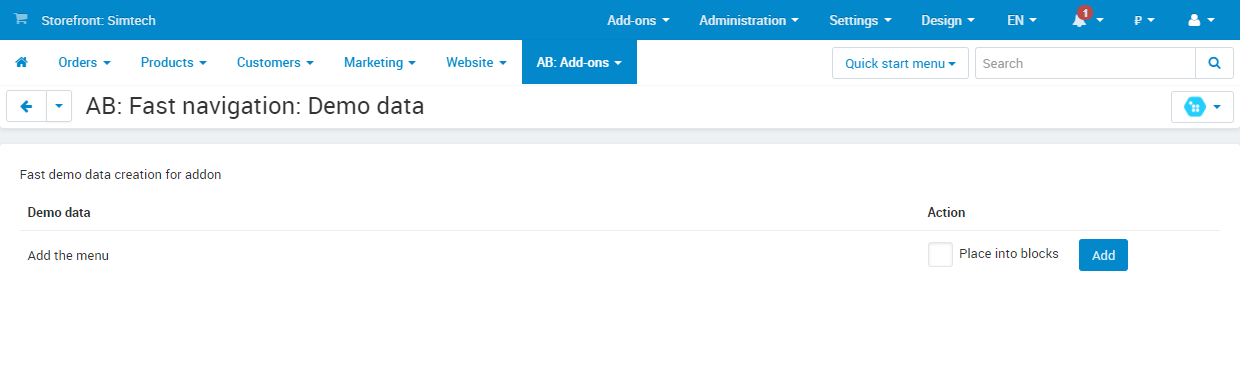
Add-on allows to create in automatic mode the AB: Fast navigation block, already filled with data structure.
For demo data adding, go to the page Administration panel → Add-ons → Manage add-ons and at the add-on name AB: Fast navigation in the gearwheel menu select the section Demo data. On the opened page press the Add button.
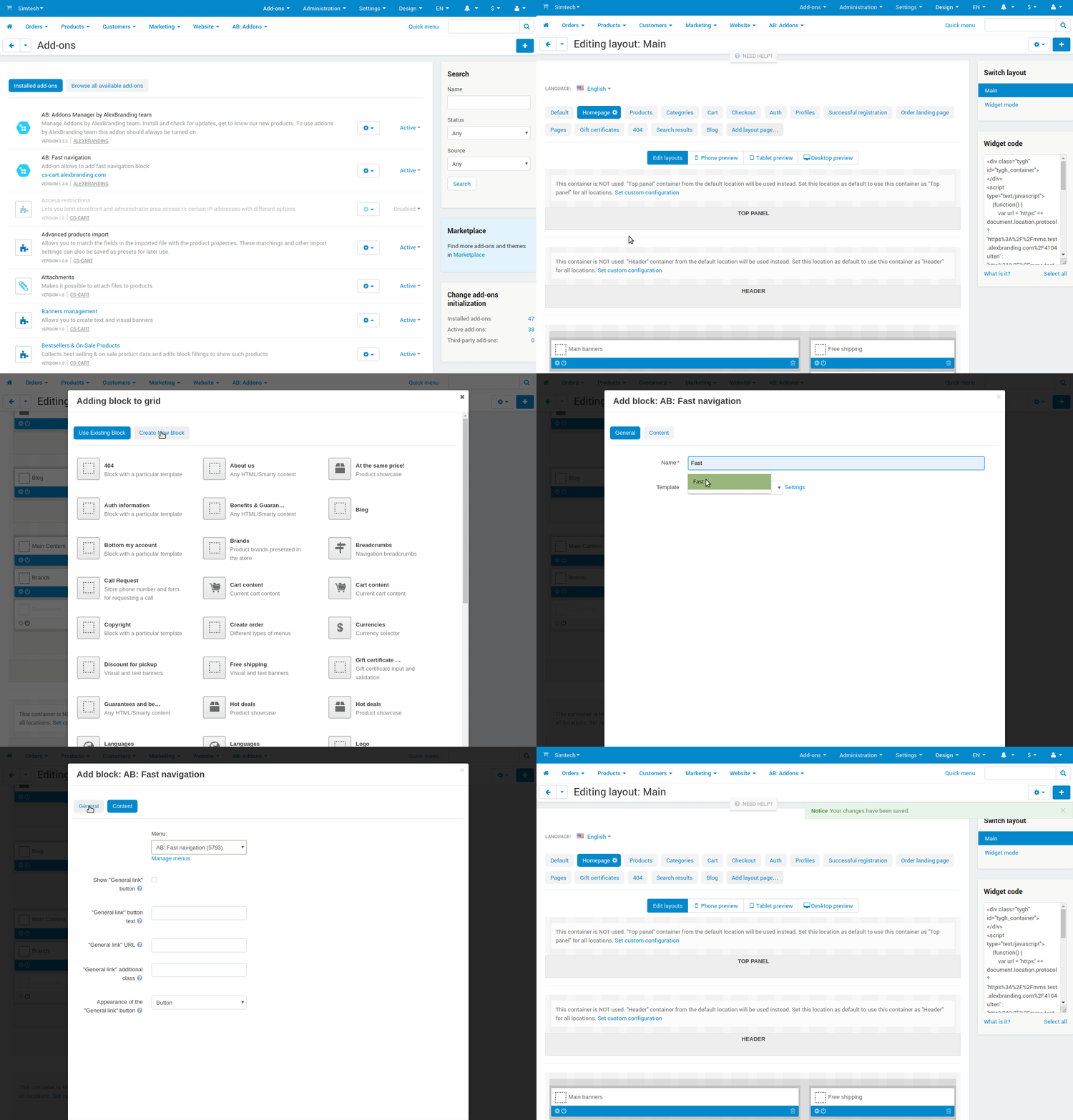
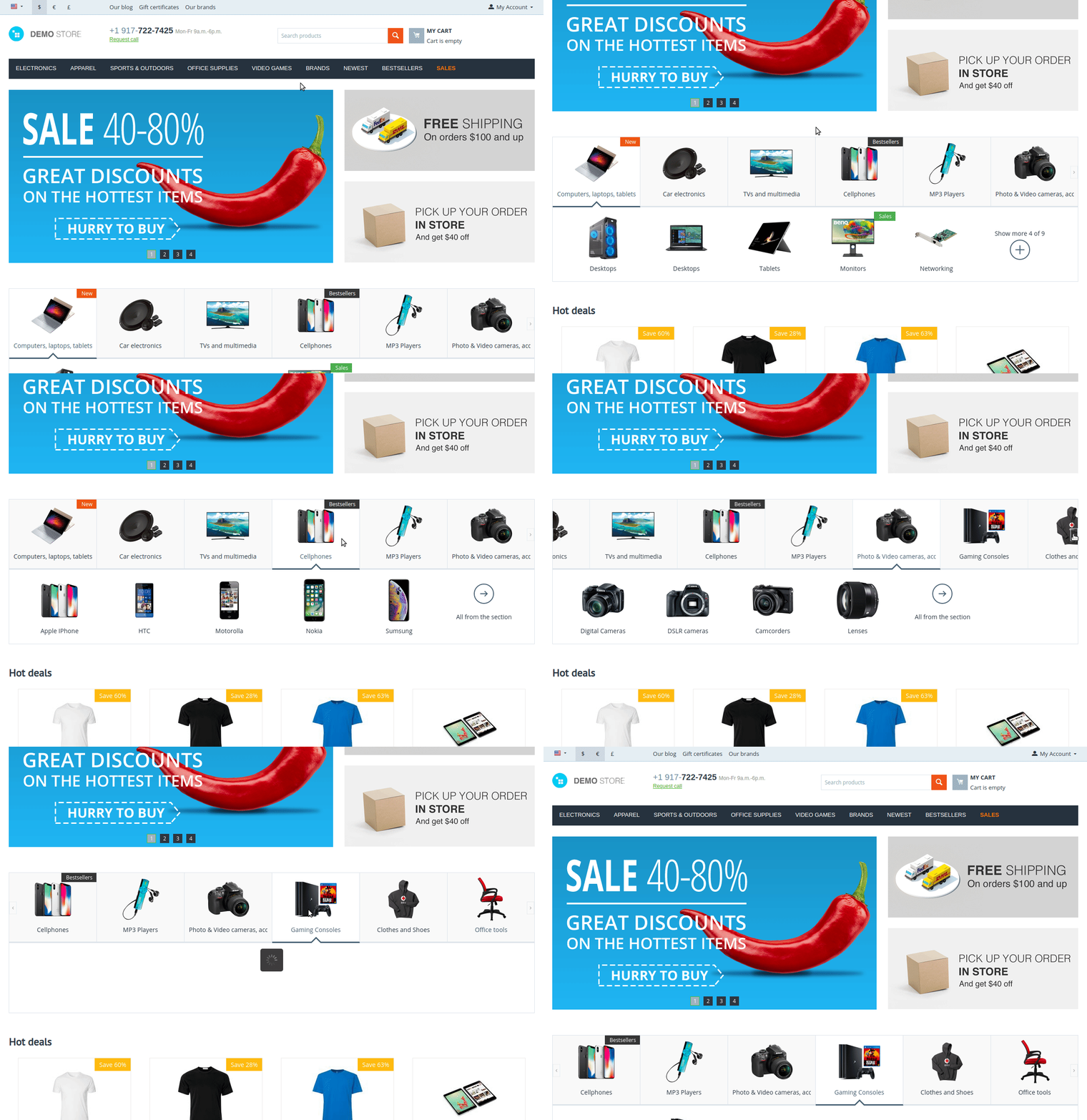
Next, it is necessary to display the block on the storefront. For this, to display the block on the homepage:
- Go to the page Administration panel → Design → Layouts → Homepage and press the plus Add block button;
- In the opened window go to the page Create New Block, choose AB: Fast navigation;
- Set the block name;
- On the tab Content choose menu name like Menu filling, which was generated with the add-on work — in view
AB: Fast navigation [XXXX], whereXXXX— randomly generated number; - Press the Create button.
linkSettings
For access to the add-on settings you should go to the page Administration panel → Add-ons → Downloaded add-ons and at the add-on name select appropriate menu item.
_en.jpg)
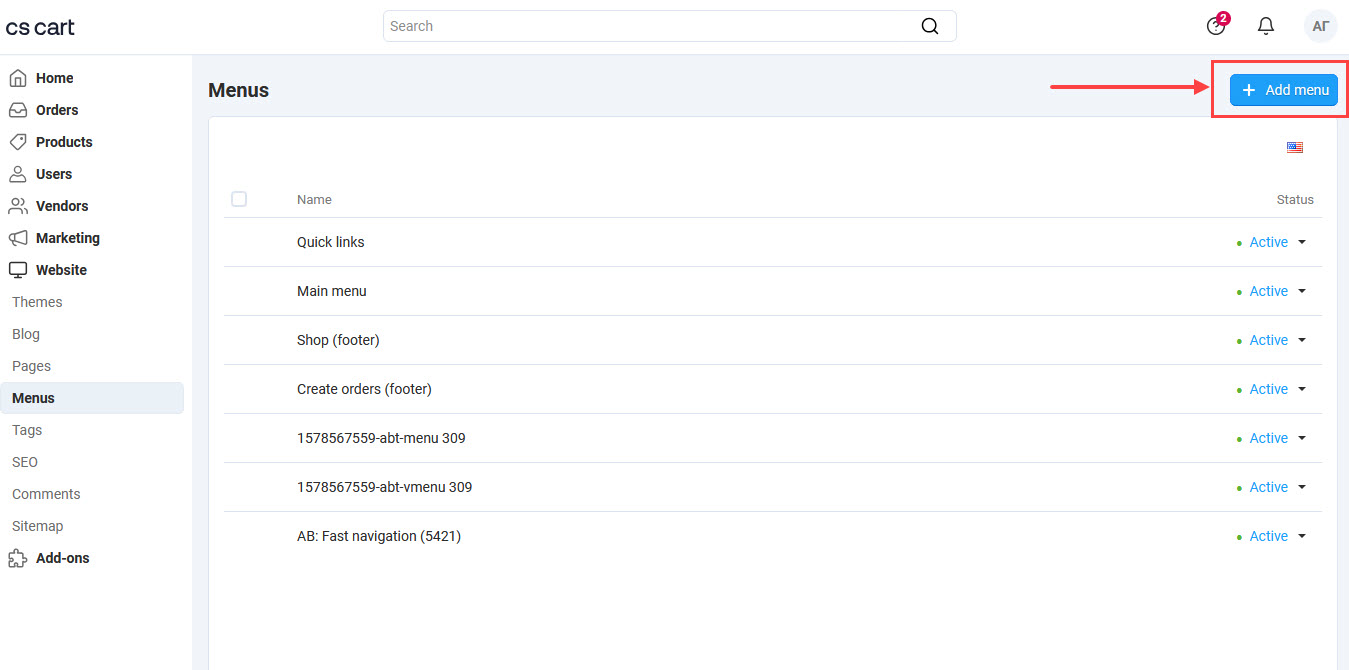
link1. Menu creating
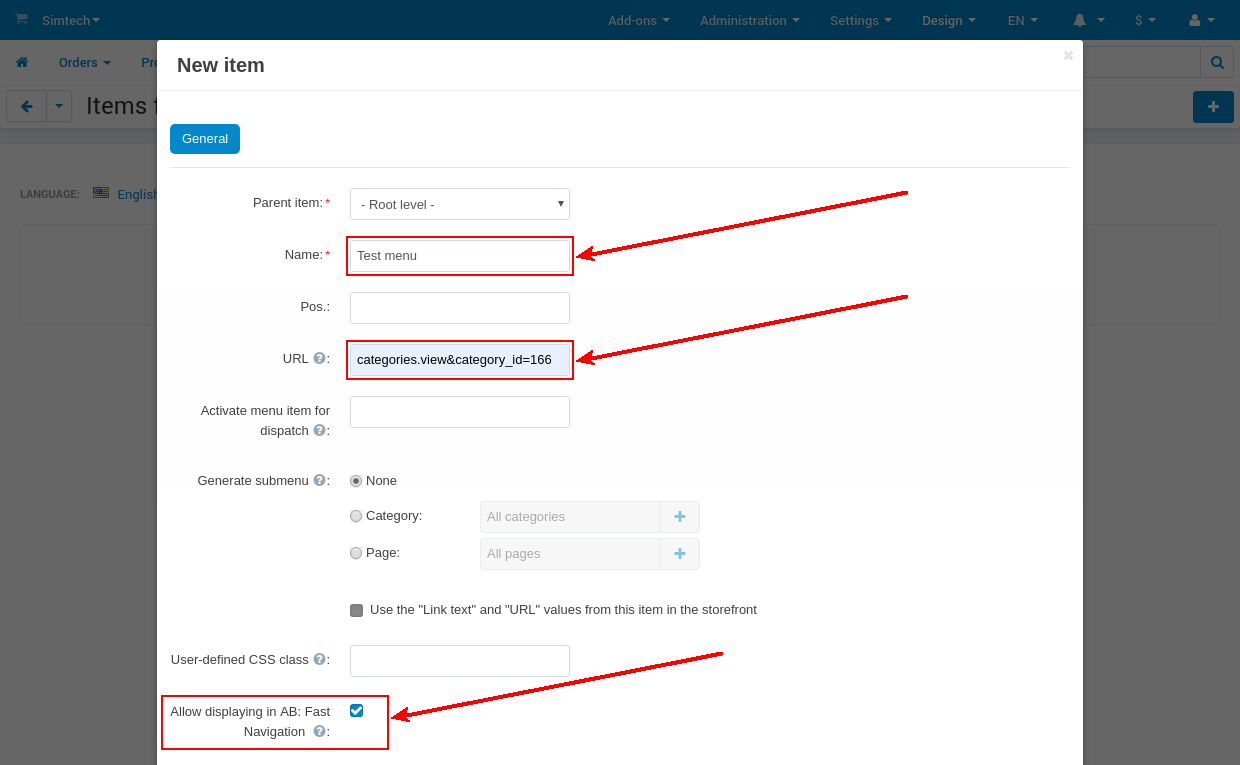
link2. Menu filling
link5. Block settings
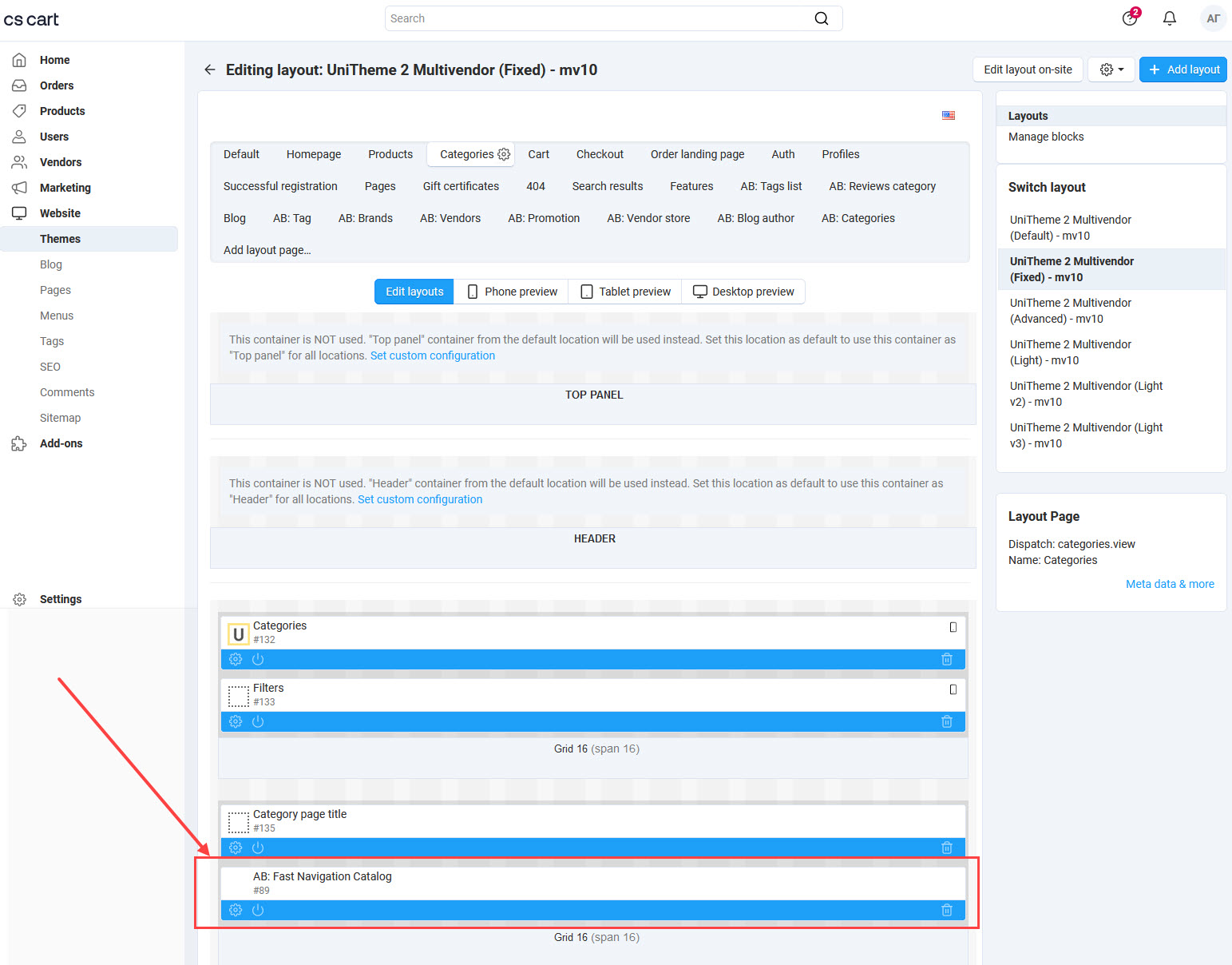
For editing tab settings, go to the page Administration panel → Design → Layouts → Products and in the block press the Blocks options gear.
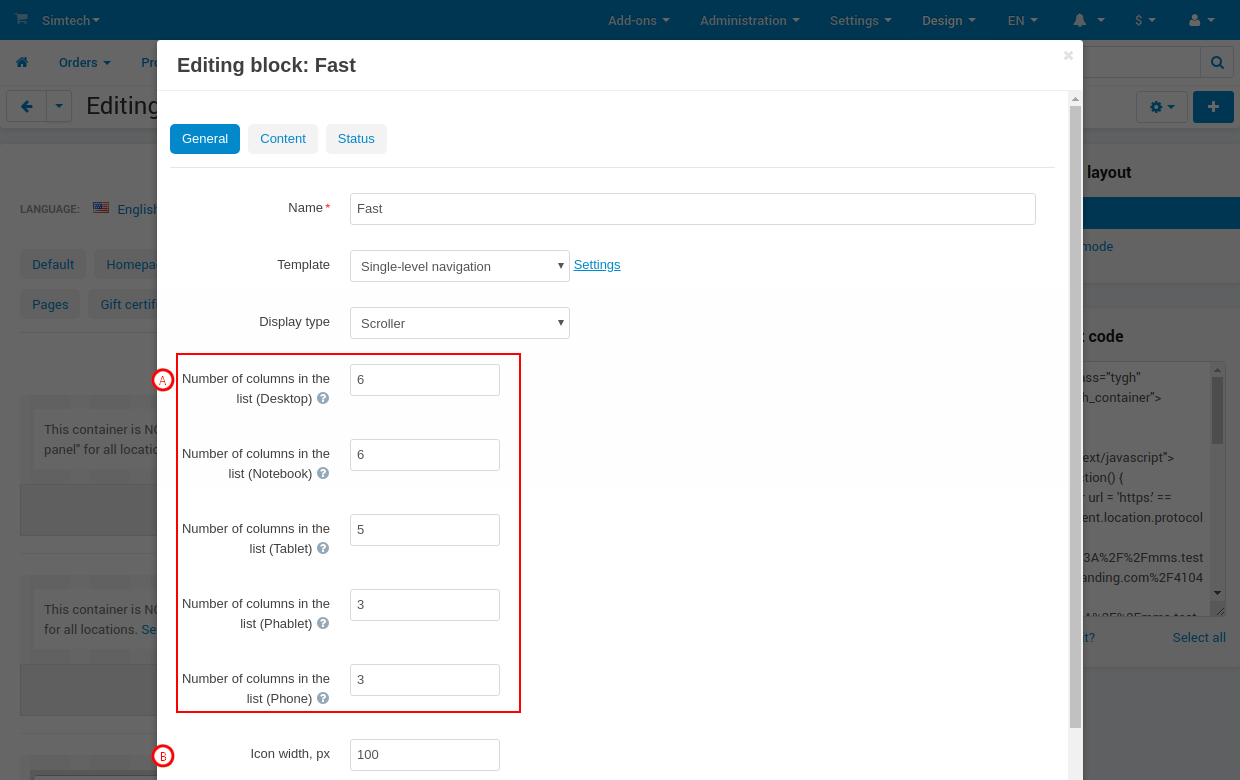
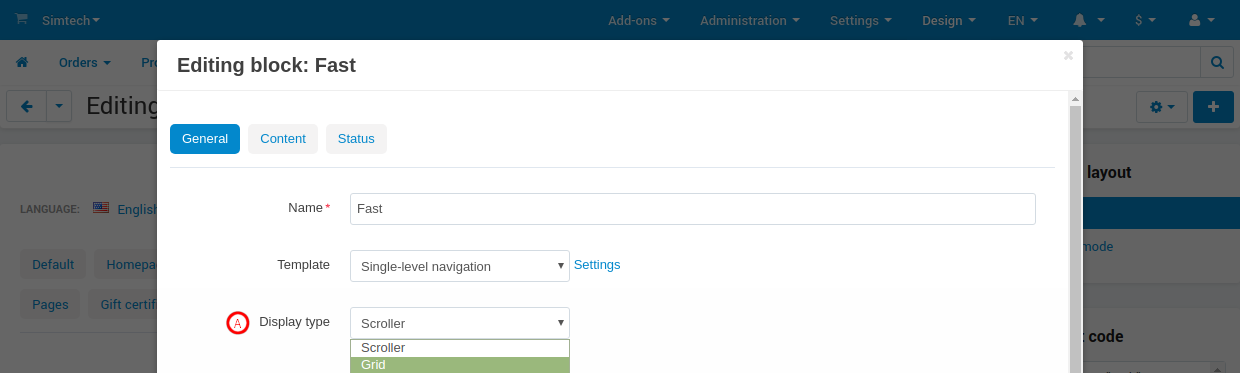
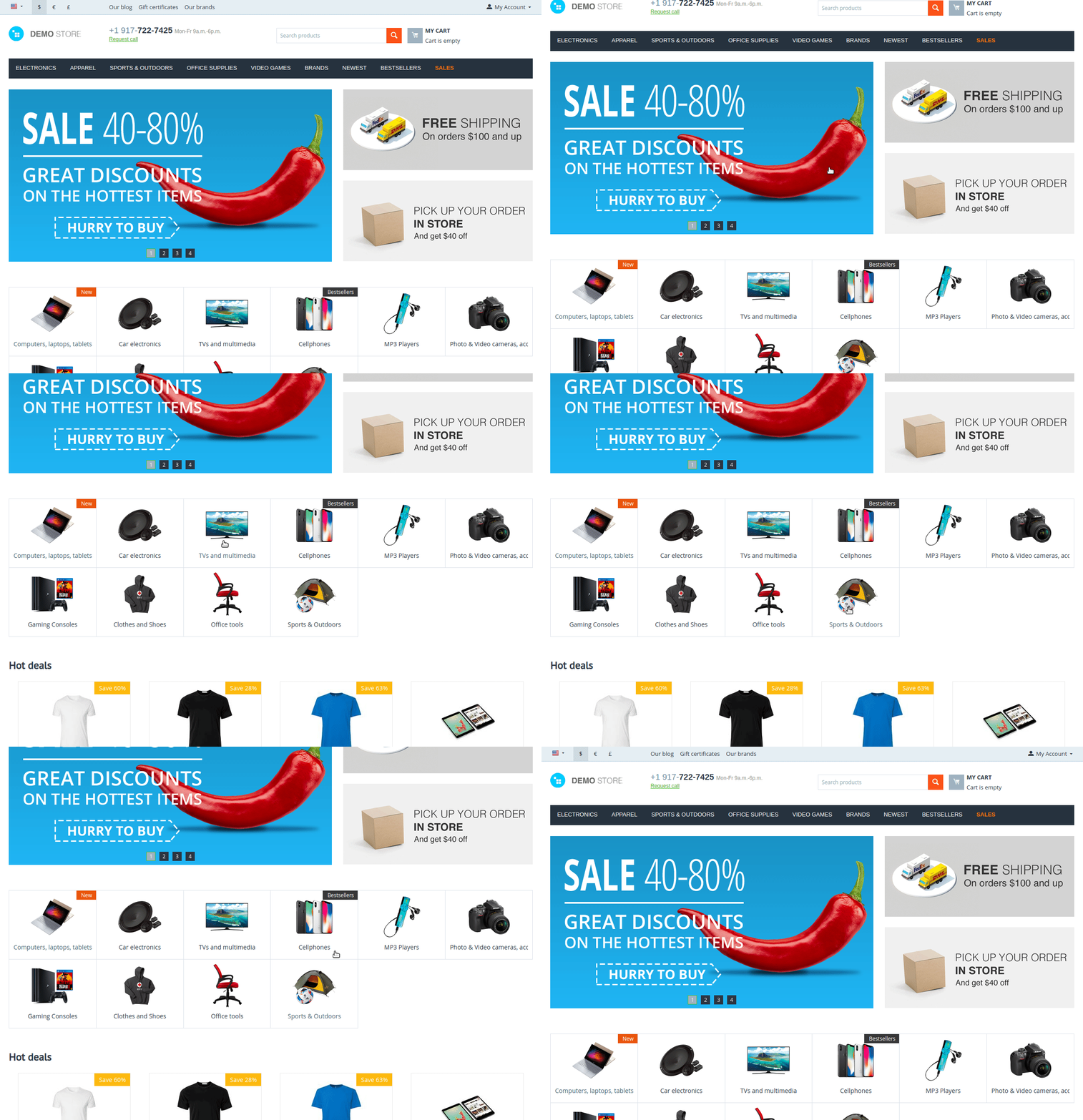
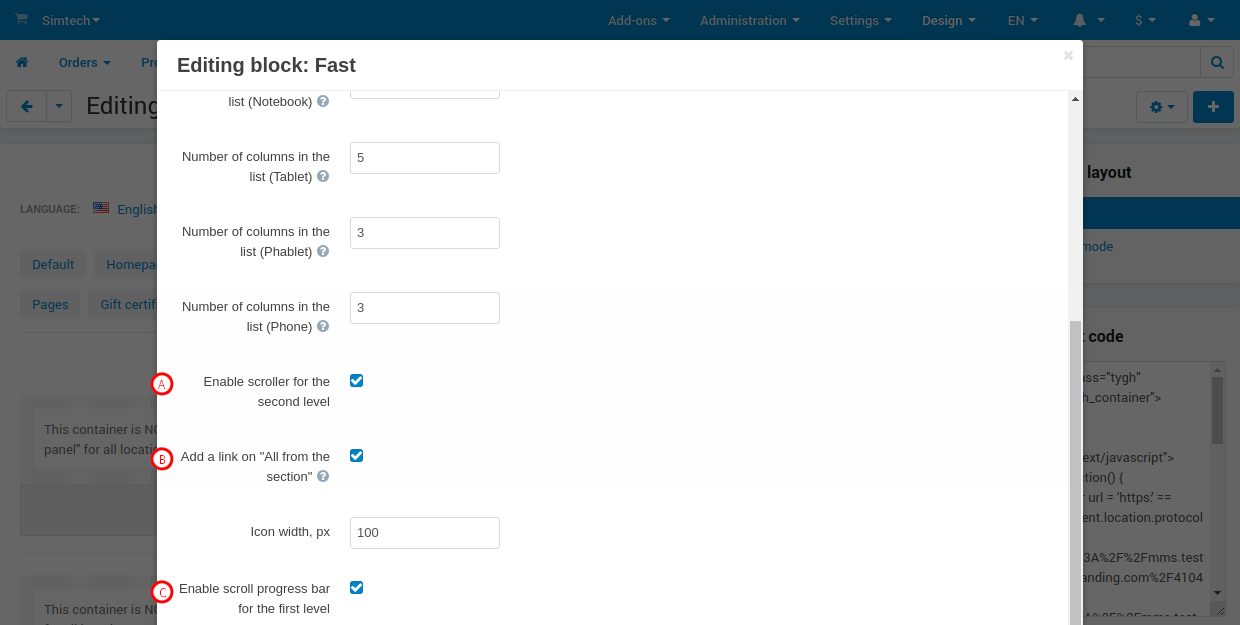
Set the block display as one of two possible templates — Single-level navigation or Two-level navigation, each of which has its individual features. Block general settings can include:
A). Number of columns in the list — specify the number of the columns for devices different types that will display a menu items list:
| Number of columns in the list | Screen size |
|---|---|
| Desktop | from 1230px or higher |
| Laptop | from 992px till 1229px |
| Tablet | from 768px till 991px |
| Phablet | from 576px till 767px |
| Phone | till 575px |
B). Icon width, px — set the value, which will be used to set the width of the downloaded navigation point image. The uploaded image will be compressed to specified width in proportion — the height will be calculated automatically.
linkIntegrations
 Preload
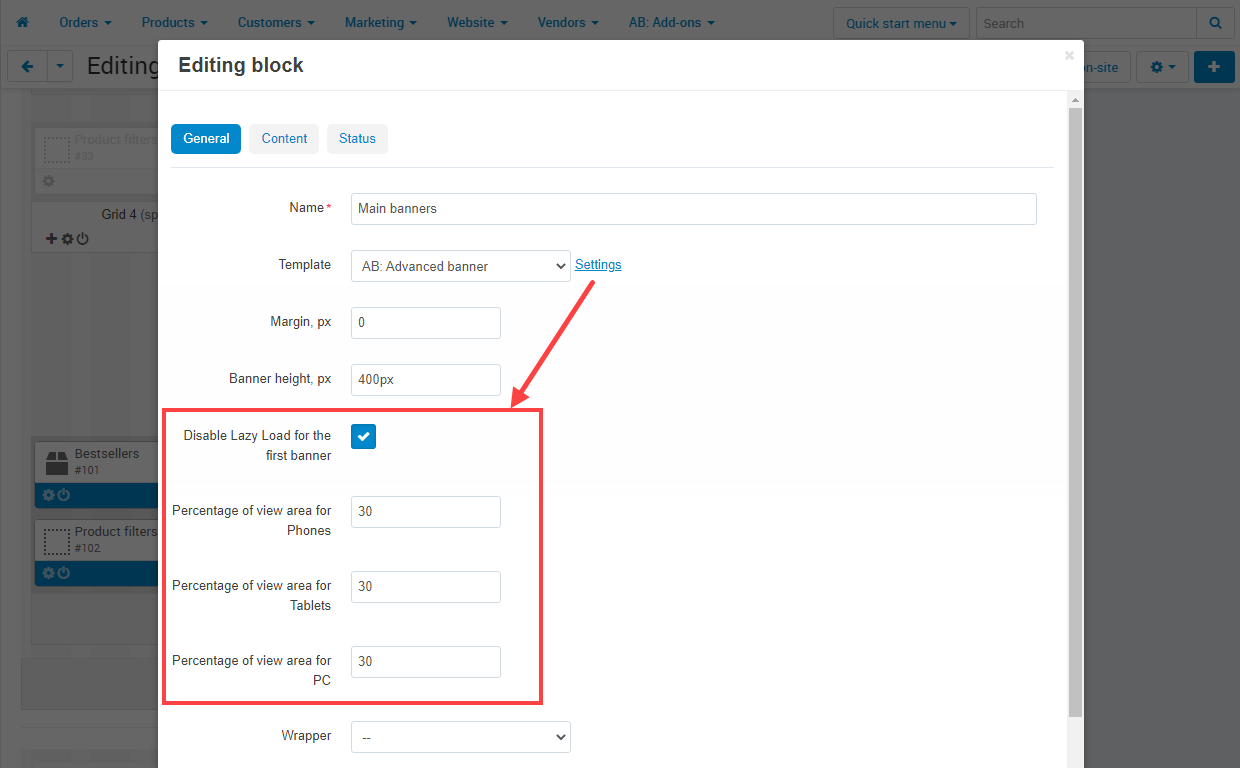
Add-on ab__preload adds its own settings into the fast navigation block, which allow to set image preload of categories and subcategories:
- Enable preload ‒ when the setting is enabled, add-on allows to preload categories and subcategories images in the fast navigation block.
- Percentage of view area ‒ part of the first screen that image takes place. There is a possibility to select settings for each device individually.

 Fast navigationМинимальная версия: 1.11.0
 SEO pages for filtersМинимальная версия: 7.6.0
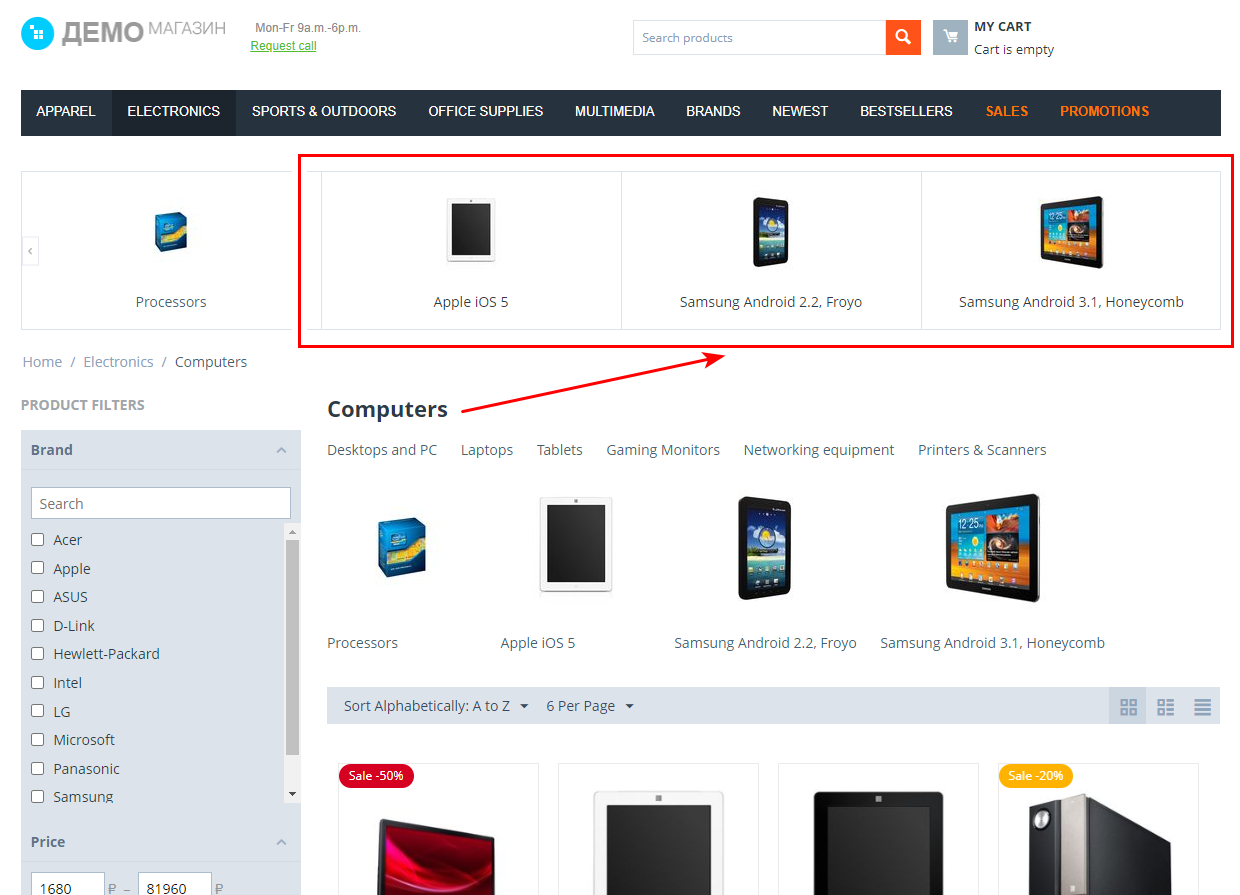
There is a setting Display the SEO page in the subcategories block on the editing page of SEO pages for filters that allows to display SEO pages of categories in the block AB: Fast navigation by subcategories.
_en.jpg "Setting on SEO page for filter")
linkHow to update
AB: Add-ons Manager will notify you about available updates (you will see an indicator of new alerts). The recommended way is to update via the CS-Cart Upgrade center (a regular procedure of the platform). This method will allow lossless configuration of the transition to the new add-on version, that is guaranteed to be compatible with your CS-Cart platform version.
To make updates procedure:
- Go to the Administration panel → Settings → Upgrade center;
- Find the appropriate update among the available updates and click the Update button;
- Follow all the instructions, that will be shown during the upgrade procedure;
- Clear CS-Cart cache and start using new add-on version.
linkList of releases
Subscribe to our Telegram-channel to get info about new releases.
v1.12.0 from 06 May 2026
New features and improvements:
[+] Added the "Emphasis active elements of subcategories block" setting. When enabled, active elements in the subcategory block will be moved to the top of the list and emphasised.
For more details, please, refer to the documentation.
[+] The design of the block has been improved for flexible styling of states.
Functionality changes:
[*] The marker is now perfectly positioned in the top right corner of the navigation element on all devices, and the design has been improved and made similar to the category menu.
[*] UniTheme2. Navigation and scrollers have been adjusted so that useful navigation items are aligned with vertical content guides. Horizontal dividers are designed to display the same information as breadcrumbs and scrollable product lists.
[*] When two-level mode is enabled, for first-level items without sub-items, instead of following a link, the behavior is changed to opening with the "All from section" button on the second level, regardless of the value of the "Add link to "All from section" setting.
[*] In the "General link" button with the "Button" appearance, the text formatting has been removed from the uppercase letters, and in the "Text" appearance, a different icon has been created in accordance with the overall style of the theme, and the display has been improved.
[*] All navigation points at all levels have the same text design: in the base state, the normal/primary color, and when hovered, the link color is non-underlined.
[*] YoupiTheme. The overall block design is closely aligned with the theme's style, and the scroll buttons are designed similarly to a scrolling product list.
Bug fixes:
[!] When adding two block instances to a page, the first block could only open the second level once, because block processing wasn't isolated and conflicting failures could occur. Fixed.
[!] If a first-level section had no second-level sections, instead of opening an empty second level, a link and simple navigation to the address would not be generated. Fixed.
[!] The "Show More" and "All from the section" buttons were incorrectly displayed for RTL languages. Fixed.
[!] The conditions for checking add-on access restrictions have been fixed.
[!] The quick navigation block had a height difference and a corresponding jerking motion in the content following it, as well as changes in the width of the items and their number in a row. Fixed.
v1.11.0 from 19 April 2023
New features and improvements:
[+] "AB: SEO pages for filters" add-on. Added view of permitted SEO pages of categories on the block "AB: Fast navigation by subcategories".
v1.10.1 from 06 Jule 2022
New features and improvements:
[+] Added compatibility with CS-Cart 4.15.1.
v1.10.0 from 14 May 2021
New features and improvements:
[+] Added compatibility with the add-on "AB: Preload" version 1.3.1 or higher.
v1.9.0 from 17 December 2020
New features and improvements:
[+] Added compatibility with CS-Cart 4.12.1.
[+] On the page of demo data adding, added the ability to place demo data in context in accordance with blocks.
v1.8.0 from 06 Jule 2020
New features and improvements:
[+] Added add-on setting "Use Ajax to download the second level elements". When setting is used the second level elements of "Two-level navigation" will be displayed after page downloading.
[+] "Watermarks" add-on. Added add-on setting "Add watermarks for quick navigation images".
v1.7.0 from 18 May 2020
Attention for UniTheme2 and YoupiTheme users.
Indicator of the images loading in the the block "AB: Fast navigation" was passed on the theme. To display the indicator, you should update the theme up to version 4.11.4.a and more.
New features and improvements:
[+] Added support of Ukrainian language.
Functionality changes:
[*] UniTheme2 и YoupiTheme: Indicator of the images loading in the block "AB: Fast navigation" was passed on the theme. To display the indicator, you should update the theme up to version 4.11.4.a and more.
[*] Dependence of the add-on "AB: Add-ons manager" was added.
Bug fixes:
[!] Unitheme2 theme. The text in the "Common button" was not centered in the block "AB: Fast navigation". Fixed.
v1.6.0 from 05 March 2020
New features and improvements:
[+] On the storefront when the "Edit texts" mode is active, added the possibility to edit:
* Menu item name/Category name;
* AB: Label text.
Functionality changes:
[*] Optimization of the addon work;
[*] Responsive theme: Removed lazy-load images.
Bug fixes:
[!] On the storefront the images were not displayed for menu items which submenu was formed with categories. Fixed;
[!] There was the setting "Appearance type" in the block setting "Fast navigation" that did not influence on anything when the "Two-level navigation" template was chosen. Fixed.
v1.5.0 from 31 January 2020
Feature additions:
[+] Added privileges.
Functionality changes:
[*] Minimal CS-Cart version 4.11.1;
[*] Changed add-on color picker to CS-Cart standard picker.
Bug fixes:
[!] In the block of "AB: Fast navigation by categories" on different categories displayed a set of the same categories (caching problems). Fixed.
v1.4.0 from 19 November 2019
Feature additions:
[+] Added a new template "AB: Fast navigation by categories" to display subcategories (available on Design → Layouts → "Categories" layout page);
Bug fixes:
[!] In the Responsive, the arrows of the second level scroller navigation did not match the arrows of the first level. Fixed;
[!] On Retina displays, images in the "AB: Fast navigation" block were not loaded using lazy-load. Fixed;
v1.3.0 from 06 September 2019
Functionality changes:
[*] Minimal CS-Cart platform version is 4.10.1;
[*] Pluses and arrows sizes were corrected;
[*] Language value on EN by default is changed;
[*] In the addon demo data were changed labels color.
Bug fixes:
[!] Automatic scrolling took place in the first level scroller. Fixed;
[!] The link "All from the section" at Ajax-loading is worked incorrectly. Fixed;
[!] UniTheme2 main menu overlapped by a level one scrollbar. Fixed;
[!] An error has occurred while editing through the content editor. Fixed;
[!] In the fast navigation block on the Responsive scrollers were displayed incorrectly. Fixed.
v1.2.0 from 10 May 2019
Feature additions:
[+] Added compatibility with UniTheme2;
[+] Added Ajax-loading elements of the second level;
Bug fixes:
[!] Fixed a bug in the "Edit content on-site" mode;